
How to Use AI at Work Without Getting Into Trouble
In March 2023, an engineer at Samsung’s semiconductor division hit a bug, opened ChatGPT, and pasted in a chunk of confidential source code to ask for help fixing it. Over the next twenty days, two more Samsung employees did their own version of the same thing: one fed in a recording of an internal meeting to get clean notes, another used it to optimize a test sequence for identifying defective chips. None of them meant any harm. All three had just handed proprietary company data to a system outside Samsung’s control, since anything typed into a consumer chatbot can be used to help train it for everyone else too. Samsung’s response was blunt: it banned ChatGPT and other generative AI chatbots for its staff outright.
That story gets told as a cautionary tale about ChatGPT. It’s really a cautionary tale about what happens when smart, well-intentioned people are handed a genuinely useful tool with zero guidance on where its edges are. Nobody at Samsung sat those engineers down and explained which categories of information were off-limits. They found out the hard way, and so did the company.
This article is the guidance those engineers didn’t get. Not a list of reasons to avoid AI at work — that ship sailed years ago, and avoiding it is no longer the safer option anyway. It’s a specific, practical map of the six ways AI actually gets people into trouble on the job, what separates a safe habit from a costly one, and what to do if you’ve already made the mistake.
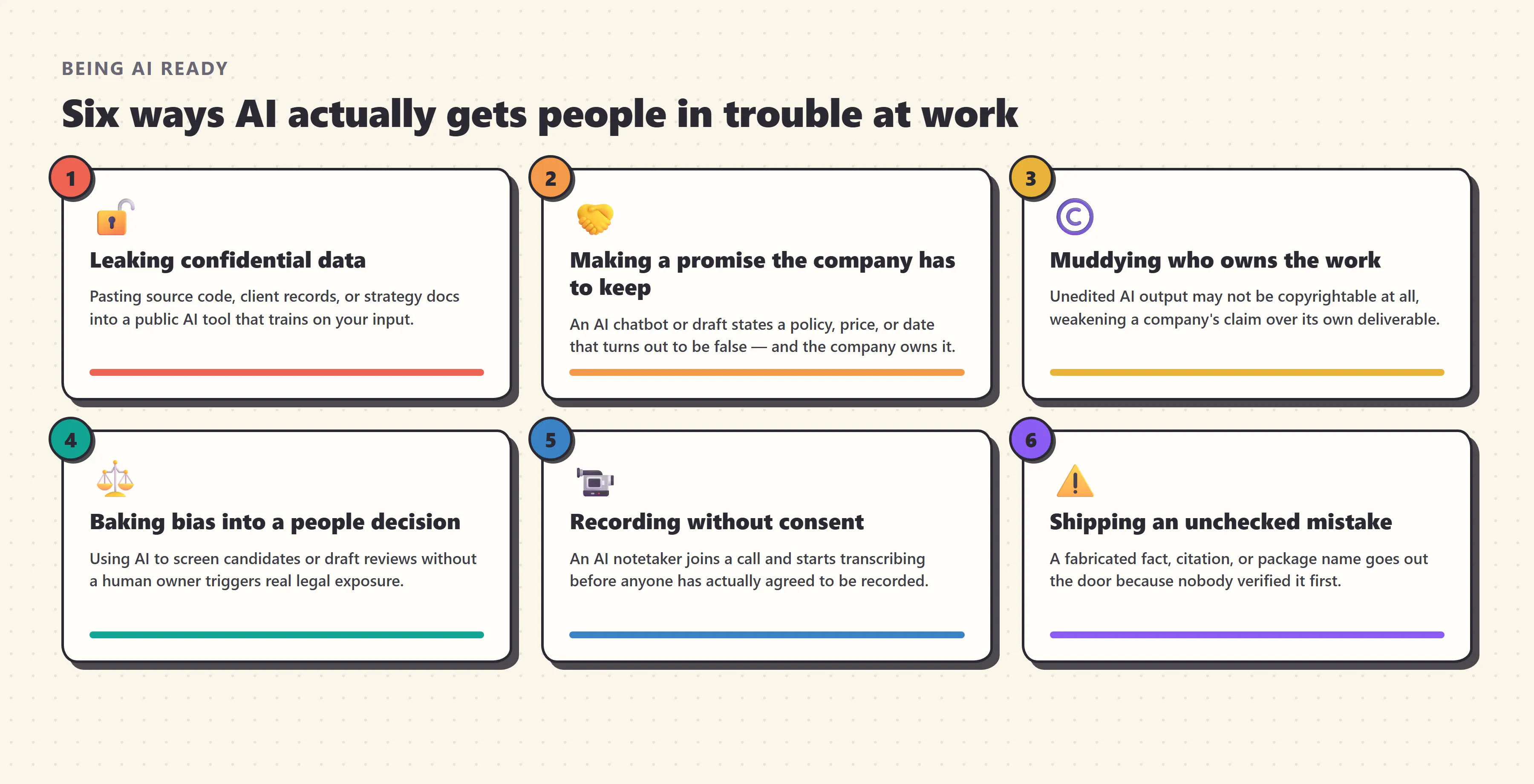
Quick answer: AI gets people into trouble at work in six recurring ways: leaking confidential data, letting an AI’s output make a promise the company has to honor, muddying who owns a piece of work, baking bias into a decision about a person, recording a meeting without consent, and shipping an unchecked mistake. None of these require avoiding AI — they require knowing which of your inputs are sensitive, which plan or tier you’re actually using, and which outputs need a human check before they leave your hands.
Here’s what you’ll walk away knowing:
- Why “shadow AI” — employees quietly using tools their employer never approved — has become the norm rather than the exception, and what that actually costs companies.
- The six specific, recurring ways AI use backfires at work, each with a real incident or legal ruling behind it.
- A simple traffic-light system for deciding what’s safe to type into an AI tool, on the spot, without asking IT every time.
- What actually separates a low-risk AI tool from a high-risk one — it isn’t the brand, it’s the plan you’re on.
- What a genuinely useful company AI policy contains, and what to do if you’ve already made a mistake.
Why this suddenly became everyone’s problem
Ten years ago, the question of “should I use this tool for work” mostly resolved itself: IT approved software, or it didn’t reach your laptop. Generative AI broke that model completely, because the best tools are a free browser tab away and genuinely make people faster at their jobs. Telling someone not to use them is asking them to be worse at their work on purpose, and most people, reasonably, don’t comply.
Microsoft’s 2024 Work Trend Index put a number on exactly how widespread that non-compliance is: 78% of employees who use AI at work bring their own AI tools rather than ones their company issued — a habit even more common at small and mid-sized companies, where formal tooling lags furthest behind. Two years later, Microsoft’s 2026 follow-up found the underlying pattern hasn’t resolved itself; if anything it’s calcified. Only 19% of organizations have reached what Microsoft calls the “Frontier” zone, where individual AI capability and organizational readiness reinforce each other instead of pulling apart.
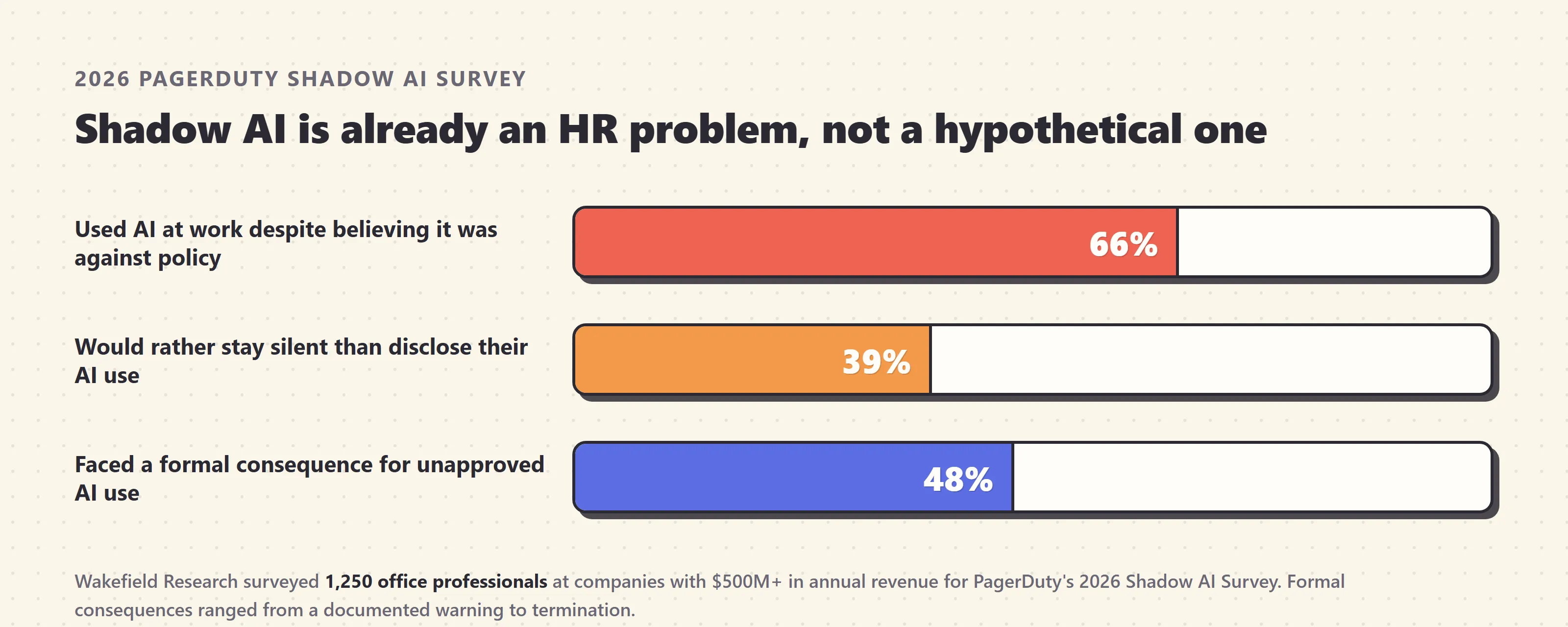
The most current, detailed picture comes from PagerDuty’s 2026 Shadow AI Survey, conducted by Wakefield Research among 1,250 office professionals at companies with at least $500 million in annual revenue. Sixty-six percent said they’d used an AI tool at work despite believing it wasn’t permitted by policy — rising to 72% at organizations with 1,500 or more employees, the ones you’d expect to have the tightest governance. Thirty-nine percent said they’d rather use AI quietly than disclose it and risk being told to stop. And critically, this isn’t hypothetical risk: 48% of people who used unapproved AI tools reported facing a formal consequence as a result, from a documented warning up through termination.
That last number is the one worth sitting with. Shadow AI isn’t a policy abstraction — it’s already resulting in real disciplinary action for a substantial share of the people doing it, often for reasons they didn’t fully understand until after the fact. The rest of this piece is about understanding those reasons in advance.
The gap between individual adoption and organizational readiness isn’t really a story about reluctant employees or careless companies. It’s a straightforward mismatch in speed: an individual can start using a new AI tool the moment it’s useful, while a company has to work out data handling, legal review, and procurement before it can offer the same tool safely — and those two clocks run at completely different speeds. The practical consequence is that most people are, right now, operating in the gap between “this would help me” and “my company has actually sorted out whether it’s safe,” with no one telling them where the edges of that gap are. That gap is exactly what the rest of this article maps.
Why banning AI doesn’t work — and what actually replaces it
Samsung’s story didn’t end with the 2023 ban. It’s worth finishing, because the ending is more useful than the beginning. A blanket ban buys a company time, not a solution — it doesn’t stop employees from wanting a faster way to do their jobs, it just pushes the same behavior further out of view, onto personal phones and personal accounts where security teams have even less visibility than before. That’s a worse position than the one the ban was meant to fix.
Samsung spent the intervening years building its own in-house model, Gauss, for the work sensitive enough to keep entirely in-house. But by mid-2026, after a two-month pilot with 2,500 employees, Samsung reversed the ban entirely and rolled out ChatGPT, Gemini, and Claude company-wide — the exact tools it had banned three years earlier. The difference wasn’t the tools. It was everything built around them: access is gated behind mandatory security training, and a data-loss-prevention layer inspects prompts in real time and blocks sensitive material before it ever reaches an external model. Gauss still handles the work too sensitive to leave the building; the external tools handle everything else, on the same infrastructure that would have caught the original 2023 leak before it happened.
That two-track pattern — a sanctioned external tool for general work, tighter controls or an internal tool for sensitive work, and technical guardrails instead of an honor system — is what shows up at every organization that’s worked through this problem seriously, not just Samsung. It’s also the practical reason this article isn’t a case for avoiding AI at work: the companies that tried prohibition already ran the experiment, and the tools came back with better guardrails around them instead. The rest of this piece is about building your own version of those guardrails, whether or not your employer has gotten there yet.
If your own workplace hasn’t reached that stage — no approved tool list, no data-loss-prevention layer, nobody who’s actually thought through which categories of information are off-limits — you’re effectively doing Samsung’s 2023 chapter right now, just without the company-wide memo. That’s not a reason to stop using AI. It’s the reason the rest of this guide exists: the same judgment calls Samsung eventually built into its systems can be built into your own habits well before your employer catches up.
The six ways AI actually gets people in trouble at work
Nearly every AI-related workplace incident that ends up in the news, in an HR file, or in a courtroom falls into one of six categories. Knowing them by name is most of the battle, because each one has a specific, learnable warning sign.
1. Leaking something you shouldn’t have
This is the Samsung story, and it’s the single most common way AI causes real damage at work. The mechanism is almost always the same: someone hits a task that would go faster with AI help, and the fastest path is pasting the actual document, code, or customer record straight into the prompt box. PagerDuty’s survey found 43% of respondents had entered work correspondence into a public AI tool, 34% had entered customer data, and 31% had entered financial information or confidential company strategy. None of that requires malice. It requires a task, a deadline, and a chat window that’s right there.
The fix isn’t “never use AI for sensitive work.” It’s knowing, before you paste, whether the tool and plan you’re using actually protects that input — which is exactly what the traffic-light framework further down handles. It’s also worth remembering that the prompt box isn’t the only door: a browser extension with broad permissions, or an AI feature quietly bundled into another app you already use, can read far more of your screen or your files than the specific thing you meant to ask about. If you can’t tell what an AI feature has access to, that’s itself a reason to check before you rely on it for anything sensitive.
2. Making a promise the company has to keep
When an AI system talks to your customers directly, its mistakes become your company’s legal obligations, not a disclaimer you can hide behind. Air Canada learned this in a British Columbia tribunal ruling: its support chatbot invented a bereavement-fare policy that didn’t exist, a customer relied on it, and the airline was ordered to pay damages after arguing — unsuccessfully — that the chatbot was a separate entity responsible for its own words. The tribunal’s reasoning was simple: everything on a company’s website is the company’s responsibility, AI-generated or not.
The same logic applies one level down from customer-facing chatbots: an internal AI draft that quotes a price, a delivery date, or a policy detail carries the same risk the moment someone forwards it externally without checking it first. Anything AI drafts that will reach a customer’s inbox needs the same review a human-written commitment would get.
This isn’t limited to airlines. New York City’s own MyCity chatbot, built to help small business owners navigate local regulations, told business owners it was legal to fire an employee for reporting sexual harassment, to withhold workers’ tips, and to refuse tenants using housing vouchers — all confidently wrong, and all illegal under the city’s own laws. A government agency isn’t a company, but the failure is identical to any internal AI assistant answering a policy or compliance question: the fluent, confident answer is not the same as the correct one, and it stays live doing damage until someone actually checks it against the source.
3. Muddying who owns the work
Copyright ownership of AI-assisted work is one of the least intuitive risks, because it doesn’t show up until someone tries to enforce it. The U.S. Copyright Office’s 2025 guidance on AI-generated materials states plainly that output produced entirely by AI, with no meaningful human creative contribution, isn’t eligible for copyright protection at all — and that merely writing a detailed prompt doesn’t count as that contribution. Where a human meaningfully selects, arranges, edits, or builds on AI output, the human’s contribution can be protected; the untouched AI portion generally can’t.
For most day-to-day work this is academic. It stops being academic the moment a company tries to enforce exclusive rights over a marketing campaign, a report, or a piece of branded content that turns out to be mostly unedited AI output — because there may be nothing there to enforce, and a competitor could legally reuse it without infringing anything. The safest habit is treating AI output as a draft you substantively shape, not a finished deliverable you pass along as-is, which also happens to make the work better and gives you a clear answer if anyone later asks what your own contribution actually was.
4. Baking bias into a decision about a person
Using AI to help sort résumés, draft performance reviews, or flag candidates for promotion sits in a different risk category than using it to draft an email, because the law already treats automated decisions about people as high-stakes. New York City’s Local Law 144 requires any employer using an “automated employment decision tool” on candidates or employees who reside in NYC — regardless of where the employer is based — to commission an independent annual bias audit, publish the results, and give candidates advance notice with an opt-out. Non-compliance carries civil penalties starting at $500 per violation and climbing to $1,500 per day.
Europe has since gone further. Under the EU AI Act, AI systems used for recruitment, candidate screening, task allocation, performance evaluation, or promotion and termination decisions are classified as high-risk outright, with the full set of obligations — risk assessments, bias testing, human oversight, and advance notice to affected workers — becoming enforceable on August 2, 2026. Non-compliance carries fines of up to €15 million or 3% of global annual turnover, whichever is higher, for any employer whose workers fall under EU jurisdiction, regardless of where the company is headquartered.
Even outside jurisdictions with a law this specific, the underlying exposure is the same everywhere: an AI tool trained on historical hiring or performance data can reproduce whatever bias existed in that history, and “the AI decided” is not a defense against a discrimination claim. Any AI involvement in a hiring, promotion, or performance decision needs a documented human reviewer who actually owns the final call.
5. Recording a meeting nobody agreed to
AI notetakers are one of the fastest-adopted workplace AI categories, and one of the least understood legally. Twelve U.S. states — including California, Illinois, and Washington — require all-party consent before a conversation is recorded, and if even one participant is in one of those states, the organizer needs consent from everyone on the call, not just their own side. Otter.ai is currently facing consolidated federal lawsuits from participants who say they never agreed to be recorded and didn’t know a bot was capturing the conversation; Fireflies.ai faces a separate Illinois biometric-privacy suit over the voiceprints its speaker-identification feature creates. Critically, no court has yet accepted “the bot’s name was visible in the participant list” as adequate notice on its own.
If you use an AI meeting assistant like Fireflies or Fathom, say out loud, before the meeting starts, that a notetaker is joining and recording — every time, not just with people you assume will mind. Extend the same courtesy to external calls by default, since you rarely know which state or country is on the other end of the line, and the consent requirement travels with the participant, not with your own location.
6. Shipping an unchecked mistake
AI output sounds equally confident whether it’s right or fabricated, and the failure mode that gets the most airtime — hallucination — is really a special case of this broader problem: something AI produced went out the door without a human actually checking it. We cover the mechanics of why this happens, and a full framework for catching it, in our companion piece on fact-checking AI answers. The workplace-specific version of the rule is narrower and easier to apply: anything AI drafts that will be sent, published, filed, or acted on needs one specific, checkable fact verified before it leaves your hands — a number, a name, a date, a citation, a claim about a person or a competitor.
This risk shows up in less obvious corners of a job than a written report, too. Researchers who studied over 2.2 million AI-generated code samples found close to 1 in 5 referenced a software package that doesn’t actually exist — a problem serious enough that attackers now register those exact fake names and load them with malware, waiting for an AI coding assistant to recommend one to an unsuspecting developer. If part of your job involves shipping AI-suggested code, checking an unfamiliar package name against the real registry before installing it takes seconds and closes off an entire category of avoidable incident.
A simple traffic-light system for what’s safe to type into AI
Most of the risk above traces back to one decision point: what did you type into the box, and did it belong there? A three-tier system makes that decision fast enough to actually use in the moment, instead of stopping to ask IT every single time.
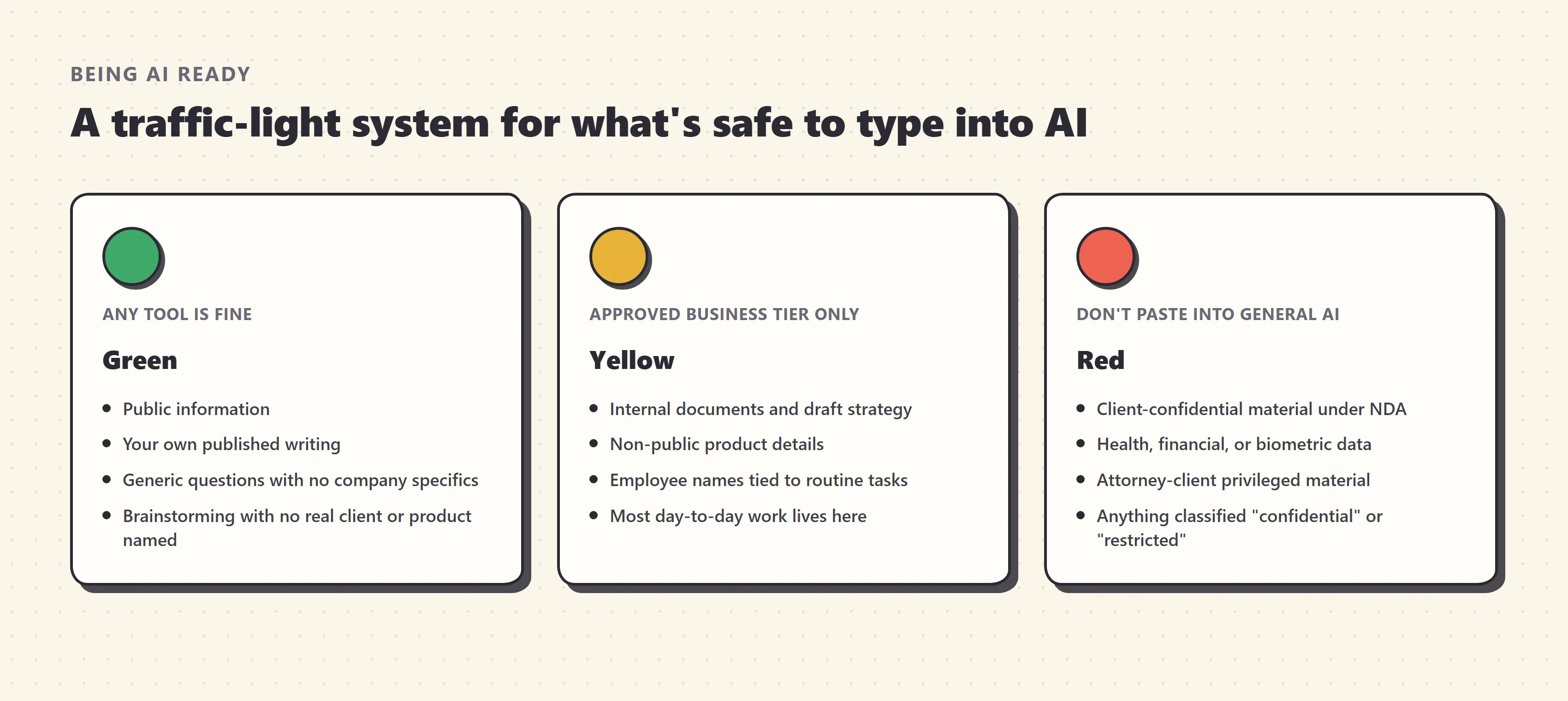
Green — safe on almost any tool. Public information, your own already-published writing, general questions with no company specifics attached, brainstorming that doesn’t reference a real client or product by name. Consumer-tier tools are fine here because there’s nothing in the prompt that would matter if it leaked.
Yellow — needs an approved, business-tier tool. Internal documents, draft strategy, non-public product details, employee names tied to ordinary work tasks. This is the zone most day-to-day work actually lives in, and it’s exactly where the tier of your AI subscription starts to matter more than the brand — covered in the next section.
Red — don’t paste this into a general-purpose AI tool at all. Client-confidential material under an NDA, anything covered by attorney-client privilege, health information, financial account numbers, biometric data, source code under a restrictive license, and anything your company’s data classification policy already labels “confidential” or “restricted.” If a task genuinely requires AI assistance with red-tier data, that calls for a dedicated, contractually governed enterprise deployment your legal and security teams have specifically signed off on — not whatever chat tool happens to be open in your browser.
When you genuinely can’t tell which tier something falls into, treat it as one shade more sensitive than your first instinct, not less — a five-minute question to a manager or a security contact costs far less than the alternative, and asking is never the version of this that gets someone in trouble.
What actually separates a safe AI tool from a risky one
The most common mistake in this whole area is treating “risk” as a property of the AI brand — ChatGPT is risky, Claude is risky — when it’s actually a property of the plan and account you’re logged into. The same model can sit on either side of a real privacy line depending on the tier.
| Consumer tiers (Free, Plus, Pro) | Business / Enterprise tiers | |
|---|---|---|
| Used to train the model | Yes, by default — you must manually opt out | No, by default — no opt-out needed |
| Admin visibility and controls | None — it’s a personal account | Company admins set retention windows and can access conversation logs |
| Data retention | Standard retention plus a 30-day abuse-monitoring window even with training off | Configurable; some enterprise tiers offer zero data retention |
| Who can see your prompts | The vendor, per its standard consumer policy | Governed by a business contract, often with stronger confidentiality terms |
OpenAI’s own enterprise privacy documentation confirms the pattern directly: data from ChatGPT Business, Enterprise, Edu, and the API platform isn’t used to train models unless a customer explicitly opts in, while the four consumer tiers do the opposite by default. The practical takeaway: before you decide whether something belongs in the yellow or green zone above, check which tier you’re actually logged into — not just which brand is on the tab. ChatGPT, Claude, and Gemini all draw this same consumer-versus-business line; none of them is inherently the “safe” or “risky” one in isolation.
Two details are worth checking specifically before you trust a business tier with red-tier data. First, “no training by default” isn’t the same as “zero retention” — most vendors still hold conversations for a short abuse-monitoring window even with training switched off, so ask whether your company’s contract includes a genuine zero-data-retention option if that distinction matters for your work. Second, an AI feature bundled into software you already use, like a spreadsheet or email client’s built-in assistant, inherits its privacy terms from that specific product’s commercial agreement, not from the parent company’s consumer app — check the actual feature, not just the logo on the icon.
What a good company AI policy actually covers
Most AI-at-work incidents don’t happen because someone deliberately ignored a rule — they happen because no specific rule existed, so the person made a reasonable-sounding guess that turned out to be wrong. A short, concrete policy closes that gap far better than a vague “use AI responsibly” memo ever does. The ones that hold up in practice tend to cover the same four things:
- A named list of approved tools and tiers — not “AI is allowed,” but specifically which products, and which plan, are cleared for which categories of work.
- A plain-language data classification, mapped to the traffic-light framework above, so people can self-check in seconds instead of guessing.
- A disclosure norm, not a permission ritual — PagerDuty’s survey found 81% of workers believe policy is enforced unevenly between leadership and staff, and that perception alone drives people toward concealment. A policy that’s genuinely applied the same way at every level gets followed more, not less.
- A named human owner for every AI-assisted decision that affects a person — hiring, performance, discipline — so “the AI recommended it” never becomes the final word.
None of these four items require a dedicated AI governance team to produce. A single shared page listing which tools are approved, which data categories are off-limits, and who to tell if something goes wrong covers most of what actually prevents an incident — the detail and enforcement teeth can come later. What matters more than thoroughness is that the policy actually gets used: Samsung’s rollout paired its tool access with mandatory training and an automated check on what leaves the network, rather than trusting a document nobody reads under deadline pressure.
If your employer doesn’t have one of these yet, the traffic-light framework and the tier table above are a reasonable personal substitute until it does — and a genuinely useful thing to hand to whoever eventually writes the real one.
Worked example: a request that touches three risks at once
Here’s how this plays out on an ordinary day. Imagine your manager asks you to use AI to draft a client-renewal email, referencing the client’s actual usage numbers, and to summarize this morning’s internal strategy call for the file.
Run it through the framework. The client’s usage numbers are customer data — yellow at best, and red if the client contract has confidentiality terms, which most do. That alone rules out a consumer-tier tool for this task. The email itself will reach the client directly, so anything AI drafts about pricing, renewal terms, or commitments needs a human check before it sends — this is risk #2, the same shape as Air Canada’s chatbot, just at smaller scale. And if you’re using an AI notetaker to summarize the strategy call, everyone on that call needs to know it’s recording before it starts, not after — risk #5.
None of that means saying no to the task. It means using a business-tier tool cleared for customer data, checking the specific numbers and commitments in the drafted email before it goes out, and announcing the notetaker at the start of the call. That’s the whole difference between a five-minute AI-assisted task and a preventable incident: not avoiding AI, just routing the same request through the right tool and the same quick check you’d apply to a human-drafted version.
A second, quieter example shows up in people-management work. Suppose you’re asked to use AI to help rank a stack of résumés before a first-round interview, or to draft language for a performance review. That’s risk #4, and it’s the one where “I was just trying to save time” holds up worst as an explanation after the fact — both NYC’s Local Law 144 and the EU AI Act treat this category as high-risk specifically because it’s easy to reach for AI here without registering that a decision about a real person’s livelihood is what’s actually happening. The safe version of this task still uses AI to save time — drafting talking points, summarizing qualifications against a rubric you set — but keeps a named human making and documenting the actual call, every time, not just when something goes wrong later.
Common misconceptions about AI risk at work
“My company doesn’t have an AI policy, so anything goes.” The absence of a written policy doesn’t remove existing law around data protection, discrimination, or copyright — it just means nobody has translated those rules into AI-specific guidance yet. The underlying obligations were never optional.
“If I’m on the paid version, my data is automatically safe.” Paid consumer tiers — Plus, Pro — still train on your conversations by default unless you manually opt out. The privacy line sits between consumer and business/enterprise tiers, not between free and paid.
“This is really just an IT and legal problem.” IT can restrict which tools are installed on a managed device, but 78% of AI use at work happens on tools employees brought themselves, often through a personal browser tab IT never sees. The habit of checking before you paste has to live with the person doing the pasting.
“Only the free, no-name AI tools are risky.” Consumer tiers of the biggest, most reputable brands — ChatGPT, Claude, Gemini — all train on conversations by default. Brand recognition says nothing about which tier of that brand you’re actually using.
“If the AI cited a source or sounded confident, the output must be reliable enough to send.” Confidence and accuracy are unrelated in a language model’s output — see our full breakdown of why AI hallucinates. Sounding certain is not the same as being checked.
“Banning the risky tools is the safest move for a company to make.” Samsung ran that experiment for three years and reversed it, replacing a rule nobody could enforce with technical guardrails and training that actually worked. A ban mostly relocates risky behavior somewhere less visible; it rarely ends it.
If you’ve already made the mistake, here’s what to do
If you’ve pasted something you shouldn’t have, the single most consequential decision is what you do in the next hour, not what you did in the prompt box.
Say something before anyone asks. Tell your manager or your security/IT team directly, in plain terms — what you entered, into which tool, and roughly when. Companies overwhelmingly respond better to early, voluntary disclosure than to a leak they discover on their own weeks later, and several of the formal-consequence cases in the PagerDuty data trace back to concealment being discovered rather than the original mistake itself.
Check whether you can delete the conversation and disable training on it. Most major tools let you delete a chat and, in your account settings, turn off future training on your history — that won’t undo model training that’s already happened, but it stops the same input from being used again and shows you took the exposure seriously.
Let security decide the scope of the response, rather than deciding for them. Whether a data leak needs a wider notification — to a client, a regulator, or a partner whose data was in the same prompt — depends on what was actually exposed and to whom. That’s a judgment call for people who can see the whole picture, not something to resolve alone out of embarrassment or a hope that it was minor enough not to matter.
Don’t compound it by staying quiet on the next one. The habit that actually causes lasting damage isn’t a single mistake — it’s the pattern of hiding AI use to avoid a conversation, which the PagerDuty data shows a meaningful share of people are already doing. One disclosed mistake is a coaching moment. A pattern of concealment is the thing that ends careers.
The bottom line
None of the six risks above are arguments against using AI at work — they’re the specific, learnable edges of a genuinely useful tool, the same way “don’t reply-all to the whole company” is a specific, learnable edge of email rather than a reason to avoid it. The pattern underneath all six is the same: know what you’re putting in, know which tier of the tool you’re actually using, and put a human check on anything that’s about to leave your hands and affect a client, a colleague, or a decision about someone’s job.
Samsung’s engineers didn’t need to avoid ChatGPT in 2023. They needed exactly this list, three years early. You have it now — that’s a short enough set of habits that, once they’re automatic, they take less time to apply than it took to read them.
Frequently asked questions
Can I get fired for using ChatGPT or Claude at work?
It depends entirely on what you typed in and what your company's policy says, not on the fact that you used AI. PagerDuty's 2026 Shadow AI Survey found 48% of workers who used unapproved AI tools faced formal consequences, from a warning to termination, usually tied to pasting in confidential, customer, or financial data rather than the tool itself. Check your policy before you paste anything you wouldn't put in a public forum.
Is it safe to paste client information into ChatGPT or Claude?
Only on a business or enterprise plan with training turned off, and only if your company's data policy actually allows it. Consumer tiers of ChatGPT, Claude, and Gemini use conversations to improve their models by default unless you manually opt out, while business and enterprise tiers exclude your data from training by default. The tier matters more than the brand — check which one you're actually logged into.
Who owns something I create using AI at work?
Your employer almost certainly owns it as a work product, the same as anything else you create on the job, but whether it's copyrightable at all is a separate and murkier question. The U.S. Copyright Office has stated plainly that output generated entirely by AI with no meaningful human creative contribution isn't copyrightable, so a document that's mostly untouched AI output may have weaker legal protection than one you've substantively edited and shaped.
Do I need to tell people I'm using an AI notetaker in a meeting?
Yes, and in some places it's legally required. Twelve U.S. states require all-party consent before a conversation is recorded, and no jurisdiction currently treats a bot's name appearing in the participant list as sufficient notice. Say out loud that a notetaker is joining and recording before it starts, especially with external participants.
What should I do if I already pasted something sensitive into a public AI tool?
Tell your manager or IT/security team immediately rather than hoping nobody notices — most company policies treat prompt disclosure far better than silent concealment, and the exposure only gets worse the longer it sits unaddressed. Check whether the platform lets you delete the conversation and disable training on it, then let your security team decide if a wider response is needed.
Does my company need a formal AI policy, or is common sense enough?
Common sense fills gaps unevenly, and the 2026 PagerDuty survey found 81% of workers believe existing AI policies are enforced differently for leadership than for staff — a sign that ambiguity itself is a risk. A short, specific written policy covering approved tools, what data is off-limits, and disclosure expectations removes the guesswork that gets people into trouble in the first place.
Related articles
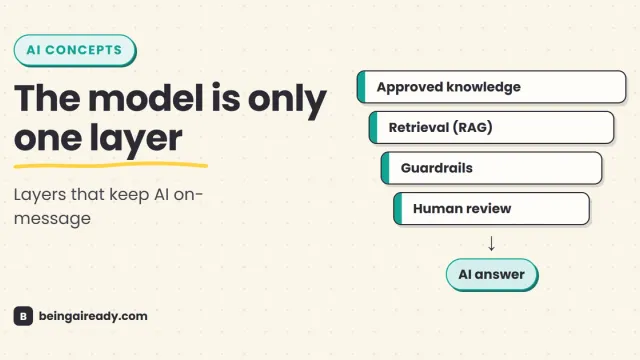
AI Answer Accuracy: How Companies Keep AI On-Message
How companies make AI answers accurate, consistent, policy-safe, and on-brand using approved knowledge, RAG, guardrails, evaluations, and human review.
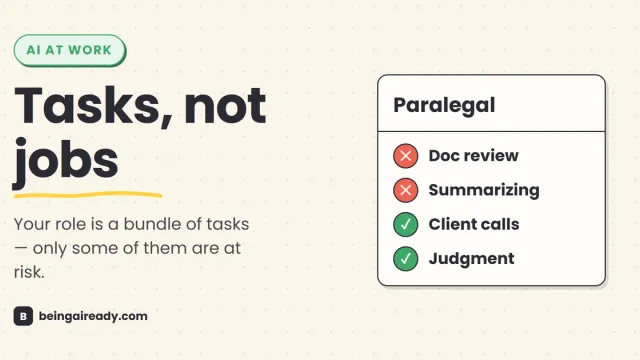
Will AI Take My Job? A Profession-by-Profession Guide
Will AI take your job? A grounded, hype-free look at what AI actually automates, profession by profession, and the task-level thinking that predicts your risk.
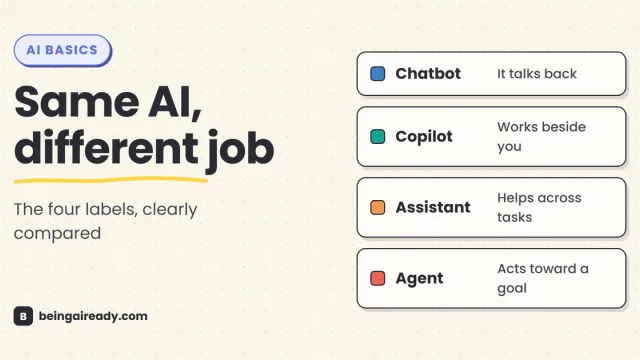
AI Agents vs Chatbots vs Copilots vs Assistants: What's the Difference?
Chatbots talk, copilots work beside you, assistants help across tasks, and agents act toward a goal. Here is how the four labels differ — and overlap.