
The Complete AI Tool Stack for Solopreneurs
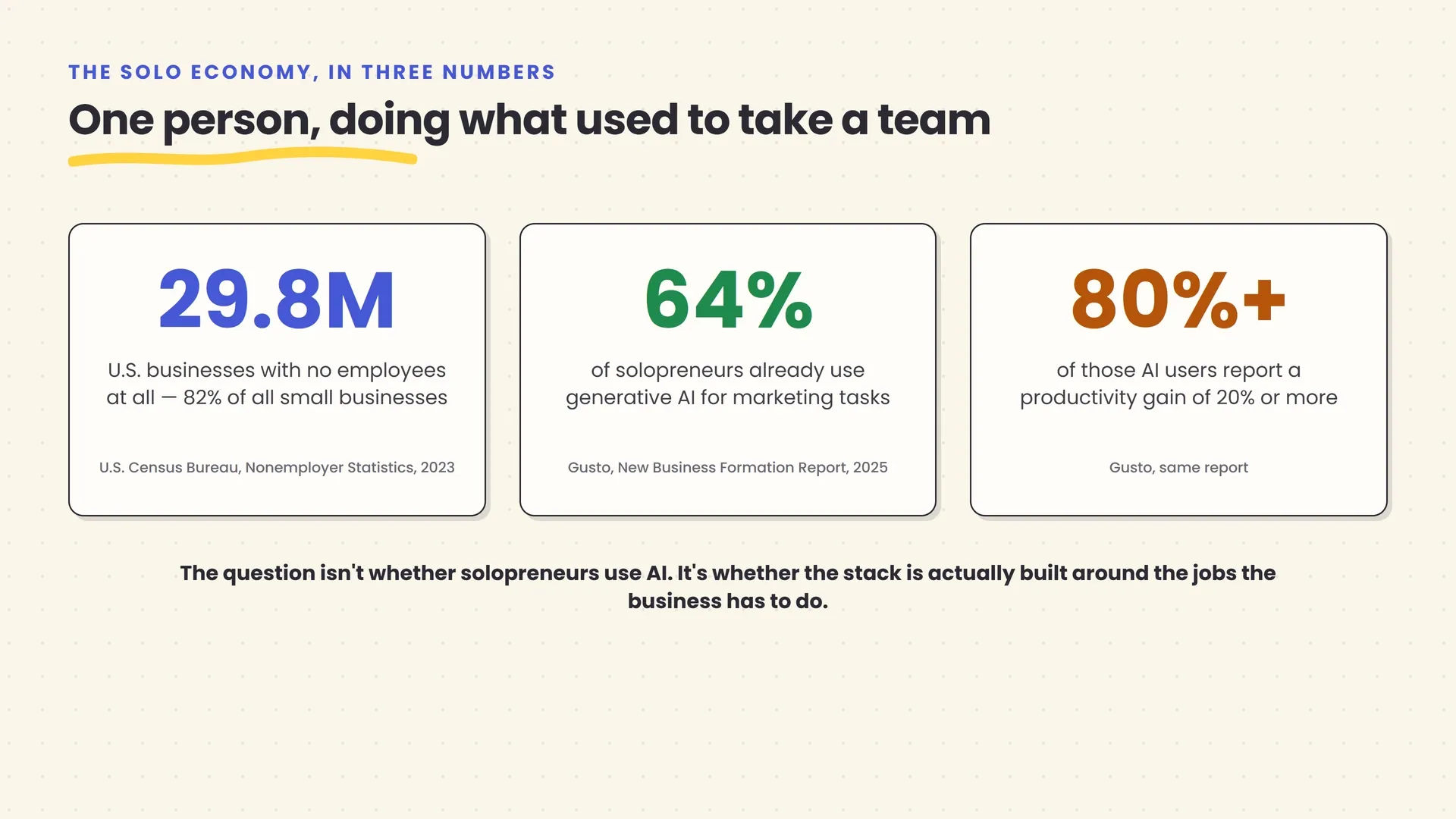
There are 29.8 million businesses in the United States with no employees at all, according to the U.S. Census Bureau’s Nonemployer Statistics — roughly 82% of all small businesses in the country. That’s not a niche. It’s the default way most American businesses now operate: one person doing the work of what used to be a small team.
This article is about the tools that make that arithmetic survivable. Not a hype pitch about AI “10x-ing your business” — a plain, job-by-job accounting of what a solo operator actually needs to run marketing, admin, customer conversations, and content without spending every waking hour on the parts of the business that aren’t the actual work. Gusto’s research on new business formation found that 64% of solopreneurs already use generative AI for marketing tasks, and more than 80% of those users report a productivity gain of 20% or more. The gap isn’t whether solopreneurs should use AI. It’s that most are assembling a stack by trial and error, one recommendation at a time, without ever stepping back to ask what the whole thing should look like.
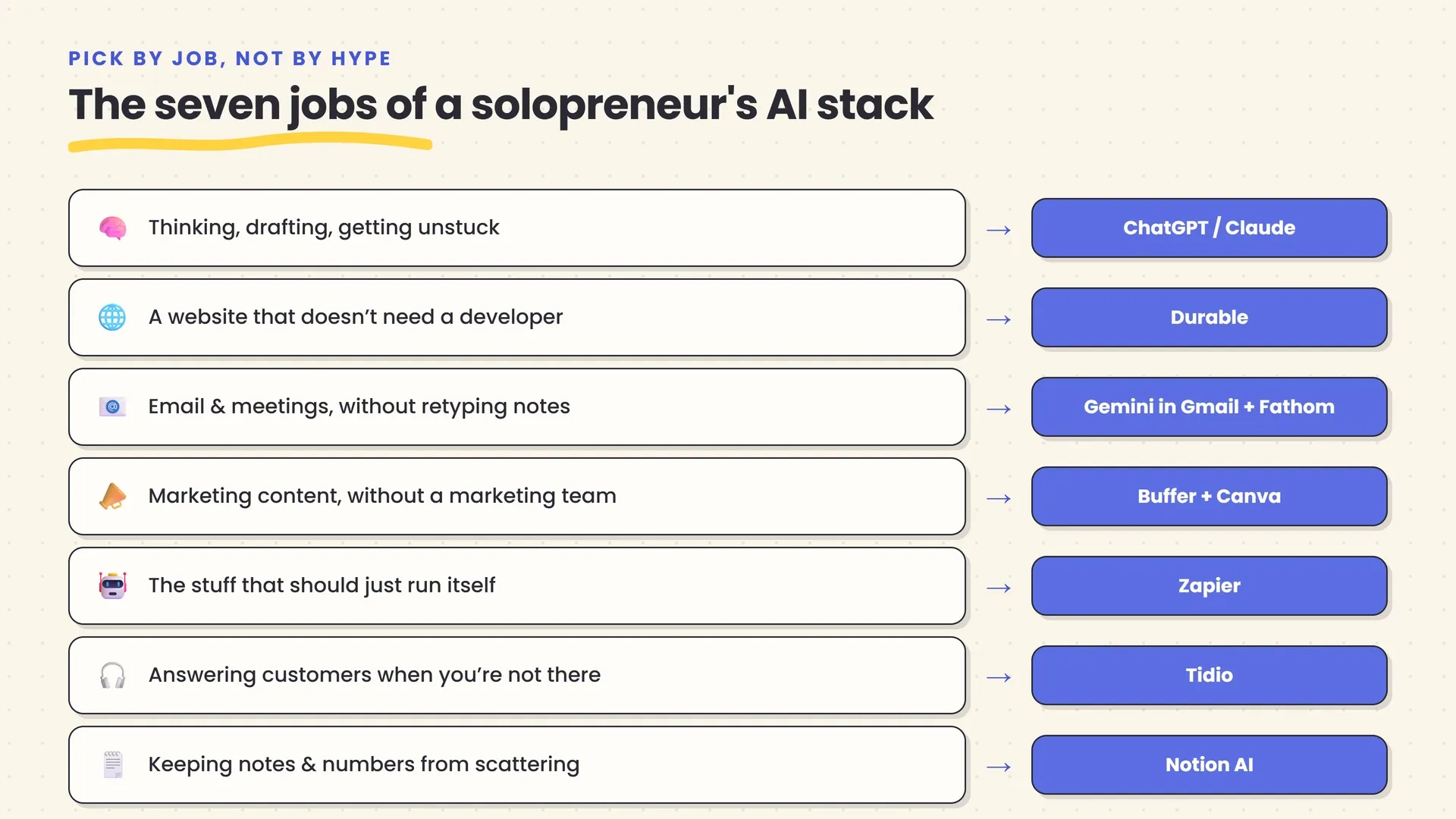
Quick answer: A solopreneur’s AI stack should map to the actual jobs of running a one-person business — thinking and drafting, a website, email, meetings, marketing content, hands-off automation, customer questions, and keeping the numbers and notes organized — not to whatever tool trended this week. Start with one general chat assistant (ChatGPT or Claude), add a tool only when a specific recurring task is costing you real time, and lean on free tiers longer than feels comfortable before paying for anything. A genuinely useful stack costs $0 to start and rarely needs to exceed $200–$230/month even at full build-out.
Here’s what you’ll walk away knowing:
- A framework for building an AI stack around the actual jobs a one-person business has to do, not a list of trending tools.
- A specific tool recommendation for each job — writing and thinking, a website, email, meetings, social and marketing content, automation, customer support, and organizing notes and numbers — with real, current pricing.
- Three honest budget tiers, from a genuinely usable $0 stack to a full $200-plus/month build-out, so you can see exactly what each additional dollar buys.
- A worked week showing how these tools actually fit together for a real solo consultant, not an idealized case study.
- The specific mistakes — subscription creep, over-automating customer-facing work, and treating every tool’s data policy as an afterthought — that turn a helpful stack into an expensive, risky one.
Why a stack, not a tool
Most “best AI tools” lists are built around a single question: which tool is best at one job. That’s the wrong question for a solopreneur, because the actual constraint isn’t finding the best tool for any single task — it’s that you are the one person responsible for every task. A brilliant customer-support agent that doesn’t talk to your email doesn’t help you. A writing tool that can’t touch your website doesn’t either.
The useful question is different: what are the actual, recurring jobs a one-person business has to do, and what does the cheapest, least-effort way to handle each one look like — hopefully with a few tools that reinforce each other rather than a dozen unrelated subscriptions. That’s a stack, in the same sense a chef has a knife, a pan, and a stove rather than forty specialized gadgets. Each piece does a distinct job, and together they cover the kitchen.
This matters more for a solopreneur than for a team, for a simple reason: a team can absorb a bad tool decision because someone else picks up the slack. A solopreneur can’t. Every subscription you add is either saving you time or quietly costing you money and attention for a problem you don’t actually have — and you’re the only person who’ll notice which one it is.
The framework: pick by job, not by hype
Before naming any specific product, it’s worth being explicit about the four questions that should decide whether a tool earns a place in your stack, because they’ll matter more than any individual recommendation below once pricing and products inevitably change.
What job is this actually for? Not “AI for my business” — a specific, nameable task: drafting client emails, scheduling social posts, answering the same three pre-sale questions. If you can’t name the job in one sentence, you’re not ready to pick a tool for it.
Does this job actually recur? A tool that saves you twenty minutes once isn’t worth learning. A tool that saves you twenty minutes every week for the life of your business is worth real money. Our companion guide on automating busywork with AI covers a more detailed version of this test if you’re deciding whether a specific task is worth automating at all.
What does it cost at your actual volume, not the advertised price? Several tools in this stack price by usage — tasks, credits, conversations — rather than a flat fee. A tool that looks cheap in a demo can get expensive fast once it runs at your real volume. Model your actual monthly usage before comparing sticker prices.
What happens if it’s wrong and you don’t catch it? AI is confidently wrong sometimes, and a solopreneur usually doesn’t have a second pair of eyes reviewing output before it goes out under their name. Keep a human checkpoint — meaning, specifically, you — on anything that touches money, a customer relationship, or your public reputation.
Job 1: Thinking, drafting, and getting unstuck
Every other tool in this guide handles one specific task. This one is different — it’s the general-purpose layer you’ll reach for dozens of times a week, for jobs too varied or too quick to justify a dedicated tool: drafting a proposal, thinking through a pricing decision, summarizing a contract before a call, rewriting a cold email that isn’t landing.
ChatGPT is the reasonable default. It’s flexible enough to handle nearly any writing or thinking task, has a genuinely usable free tier, and its Plus plan ($20/month) covers the large majority of what a solo operator needs — drafting, editing, brainstorming, and basic file analysis. Claude is worth having open alongside it, or instead of it, specifically for document-heavy work: its Projects feature lets you upload contracts, past proposals, or research once and reuse them across every conversation, which matters if your work involves reading and synthesizing long documents regularly. Claude’s paid plan is also $20/month billed monthly ($17/month billed annually).
You don’t need both from day one. Pick whichever fits your actual work better — Claude if you’re constantly working with long documents, ChatGPT if you want the broader ecosystem and voice mode — and add the second only once you notice yourself hitting its specific limits. For daily proofreading rather than drafting, Grammarly is worth layering on top: its free tier catches basic grammar and clarity issues inside Gmail, Docs, and your browser, and it doesn’t compete with a chat assistant so much as complement it as an always-on safety net for anything you send out under your own name.
What this replaces: the instinct to hire out or agonize over every first draft — a proposal outline, a difficult email, a rough business plan section — that used to eat an evening.
Job 2: A website that doesn’t need a developer
For most solopreneurs, a website isn’t a product — it’s a business card that also takes bookings or explains what you do. Durable is built specifically for this: describe your business in a sentence, and it generates a complete, published site in roughly 30 seconds, aimed squarely at solopreneurs and small service businesses rather than at agencies or e-commerce brands.
What makes Durable worth naming specifically here, rather than a more design-flexible builder like Framer or Wix, is the bundle: every plan, including the free one, includes an AI assistant for ongoing content, and paid plans add a lightweight CRM, invoicing, and automated lead capture — three separate small-business subscriptions folded into one. The free plan gets you a live site on a Durable subdomain with basic CRM for up to 10 customers; the Launch plan ($25/month, or $22/month billed annually) adds a custom domain, more AI usage, and lead-response automation.
The tradeoff is design flexibility — Durable optimizes for speed over pixel-level control, so if your brand genuinely needs a highly custom look, a tool like Framer is the better starting point. For most service-based solopreneurs — consultants, coaches, local contractors — that tradeoff is the right one: a professional site live today beats a perfect one you’re still tweaking in a month.
What this replaces: either months of procrastinating on a “someday” website project, or a few hundred dollars paid to a freelance developer for something you could describe in one paragraph.
Job 3: Email and meetings, without retyping everything twice
Email and meetings are where a solopreneur’s attention actually leaks, because both demand real-time responsiveness and neither naturally produces a record you can search later without effort.
If you’re on Gmail, Gemini in Gmail is the lowest-friction starting point — it’s built directly into the interface you already use, summarizing long threads and drafting replies without adding a new app to learn. It comes included with Google Workspace Business Standard and higher plans, or via a personal Google AI subscription starting at $7.99/month. Once your inbox volume justifies a dedicated tool, Fyxer AI goes further: it automatically triages incoming mail into needs-a-reply, FYI, and noise, drafts replies matched to your actual writing voice, and bundles in an AI meeting notetaker — starting at $30/month for a single inbox ($22.50/month billed annually), with no permanent free tier, just a 7-day trial.
For meetings specifically, Fathom is the strongest starting point precisely because its free plan is a real free plan — unlimited recording and transcription across Zoom, Google Meet, and Microsoft Teams, not a time-limited trial. Advanced AI-templated summaries cap at five calls a month on the free tier; the Premium plan ($16/month billed annually, $20/month billed monthly) removes that cap and adds AI-drafted follow-up emails and conversational search across your past meetings. For a solopreneur doing client calls, sales conversations, or consultations, that search feature alone — asking “what did this client say about their budget last month?” instead of rewatching a recording — is often worth the upgrade on its own.
What this replaces: typing the same meeting notes from memory an hour after a call ends, and the low-grade dread of an inbox you can’t remember the state of.
Job 4: Marketing content, without a marketing team
Marketing is usually the first job a solopreneur either drops entirely or does inconsistently, because it’s the one without a deadline forcing it to happen. AI tools help less by writing brilliant copy and more by lowering the activation energy to post at all.
Buffer is the right starting point for scheduling: it’s built around simplicity rather than a full social-suite feature set, and its AI Assistant — which drafts captions, adapts one message’s tone across platforms, and suggests posting times — is included free and unlimited on every plan, including the permanently free tier (3 channels, 10 queued posts per channel). Paid plans start at $5 per channel per month (Essentials, billed annually). If you also manage a client-facing inbox or need sentiment tracking, Hootsuite is worth a look, but for a single person managing their own brand, that’s usually more than you need.
For the visuals themselves, Canva covers more ground for a solopreneur than a presentation-specific tool would: its Magic Design feature generates social graphics, one-pagers, and slide decks from a prompt, backed by a genuinely large free asset library, with Pro (roughly $15/month, about $10/month billed annually) adding a Brand Kit that auto-applies your saved colors, fonts, and logo across everything you generate. If you don’t have a logo yet, Looka is a fast, low-stakes way to get one — free to design and preview, $20 one-time for a basic PNG, or $65 one-time for vector files with full copyright ownership, which is meaningfully cheaper than commissioning a designer for a first logo concept.
If your marketing leans on written content — blog posts, service pages, anything meant to rank in search or get cited by AI answer engines — Frase is the most budget-appropriate option in its category, starting at $39/month billed annually. It generates content briefs from real questions people actually ask, scores drafts against both classic SEO and the newer discipline of generative engine optimization (getting cited by tools like ChatGPT and Google AI Overviews, not just ranked by them), and publishes directly to WordPress, Webflow, or Wix.
What this replaces: the marketing that simply doesn’t happen because there was no time left after doing the actual client work — which, for most solopreneurs, is where marketing effort actually goes to die.
Job 5: The stuff that should just run itself
Some tasks aren’t worth your attention at all, in the sense that a person reading them and typing a response adds no judgment a rule couldn’t apply just as well. New lead lands in a form, add them to a spreadsheet and send a confirmation. Invoice gets paid, update a tracker. This is the job automation platforms solve, and Zapier is the reasonable default for a solopreneur specifically because it optimizes for the least technical setup of any option in its category — roughly 8,000 pre-built app integrations and the gentlest learning curve, at the cost of pricing that scales less favorably than competitors once volume climbs.
The free plan (100 tasks/month, two-step Zaps only) is genuinely enough to test one real automation before paying anything. The Professional plan ($19.99/month billed annually, $29.99/month billed monthly) unlocks multi-step workflows and roughly 750 tasks — plenty for a single person’s recurring processes: routing a new inquiry, logging it, drafting a first-pass reply for your review. Our deeper guide to automating busywork without code walks through a full worked example of exactly this kind of workflow, plus the honest failure modes worth knowing before you build one.
The one caution worth repeating here specifically for solopreneurs: because you’re the only reviewer, resist the temptation to automate all the way through to “send” on anything customer-facing. Build the automation to draft, log, and notify — and keep the final click of anything that goes out under your name as a deliberate, manual step, at least until you’ve watched it run correctly for a few weeks.
What this replaces: the twenty small, forgettable tasks a week that don’t individually justify attention but collectively cost real time — the thing our guide to AI automation calls “busywork” for exactly this reason.
Job 6: Answering customers when you’re not available
A one-person business has exactly one person available to answer a customer question, and that person sleeps, takes calls, and occasionally goes on vacation. Tidio, specifically its Lyro AI agent, is the standout option for this job at solopreneur scale because it’s built for self-serve adoption rather than an enterprise sales process — every Tidio plan, including the permanently free one, includes 50 Lyro AI conversations a month at no charge, trained on your own site content rather than a rigid decision tree.
Lyro handles written, inbound conversations — chat and messaging, not voice — and escalates automatically to you when it can’t answer or a customer explicitly asks for a human. Beyond the free allowance, Lyro is billed as a usage-based add-on (roughly $32.50/month for 50 conversations, scaling with volume) on top of a base Tidio plan starting around $24/month annually for human-agent seats. For most solopreneurs, the free tier alone is enough to meaningfully cut down on repeated, answerable questions — order status, hours, pricing basics — before it’s worth paying anything.
The honest limit: this is a tool for pre-sale and routine post-sale questions, not for anything genuinely sensitive or emotionally loaded. A refund dispute or an angry customer is exactly the kind of conversation that should escalate to you immediately, not get a well-formatted AI response first.
What this replaces: either losing a sale because you were asleep when someone asked a basic question, or the constant low-grade interruption of answering the same five questions by hand, over and over, every week.
Job 7: Keeping your notes and numbers from scattering
The last job is the least glamorous and the easiest to skip — and it’s usually where a growing solo business quietly starts losing money and time, because nothing is actively broken, it’s just scattered across six different places nobody, including you, remembers to check.
Notion AI is worth naming specifically here because it combines notes, a lightweight project tracker, and a real client or content database in one place, and its Ask Notion feature can answer questions across everything in your workspace rather than one note at a time — “what did I quote this client last time” instead of scrolling back through months of pages. Basic AI writing help exists on the Plus plan (roughly $10/month billed annually); full AI features, including Ask Notion and its AI Agents, require the Business plan (roughly $20/month billed annually) as of Notion’s 2026 pricing restructure.
For the numbers side, whichever spreadsheet you already use almost certainly has AI built in now: Gemini in Google Sheets if you’re in Google Workspace (included from Business Standard, around $14/user/month annually), or Copilot in Excel if you’re on Microsoft 365 (a separate Copilot add-on, currently $18/user/month annually on a promotional rate through September 2026). Both handle the everyday spreadsheet friction — writing a formula from a plain-language description, cleaning up messy exported data — without switching tools or file formats, which matters more for a solopreneur than raw analytical power, since the goal is spending less time fighting the spreadsheet, not building a more sophisticated one.
What this replaces: the mental tax of half-remembering where a piece of information lives, and the actual lost time re-deriving something — a quote, a client preference, a number — you already had once and can’t find again.
The jobs this stack still can’t do for you
Everything above is genuinely useful, and none of it is a substitute for the parts of a one-person business that were never really about typing speed or admin overhead in the first place. Worth being explicit about this, because a stack like this one can quietly create the impression that the hard parts of solo work are now solved.
Deciding what your business actually is. No tool in this guide picks your positioning, your pricing, or which clients to say no to. AI can help you draft the words once you’ve made that call; it has no basis for making it, because it doesn’t know what you’re actually trying to build or what you’re willing to trade off to get there.
Selling. A chat assistant can draft a cold email and a scheduling tool can book the call, but the actual sales conversation — reading hesitation in someone’s voice, knowing when to drop the price and when to walk away, building the kind of trust that gets a client to refer you to someone else — is still a fundamentally human skill. The PwC 2026 Global AI Jobs Barometer found AI-skilled workers earning a 62% wage premium over those without, and the same broader research consistently finds judgment and relationship skills, not typing output, as what’s actually scarce and rewarded.
Anything with real legal, financial, or safety stakes. A contract clause, a tax decision, a client dispute that could end up in a demand letter — these deserve a human professional’s review, not just an AI’s confident-sounding draft. Treat every tool in this stack as producing a first pass you’re accountable for, not a finished answer, especially anywhere a mistake would actually cost you money or a client relationship.
The work only you can actually do. If the reason someone hires you and not a competitor is your specific expertise, taste, or way of thinking about a problem, no tool in this stack should be doing that part. Use these tools to clear away everything around your core work — the admin, the scheduling, the first-draft busywork — so more of your actual week goes to the thing you’re specifically good at, not less.
None of this is a reason to avoid the stack above. It’s a reason to be precise about what it’s actually for: buying back the hours that used to go to the repetitive, low-judgment parts of running a business, not replacing the judgment itself.
What this actually costs: three honest tiers
Pricing across this stack ranges from genuinely free to a few hundred dollars a month, and which tier makes sense depends entirely on how much of your week each job actually consumes — not on which tier sounds more serious.
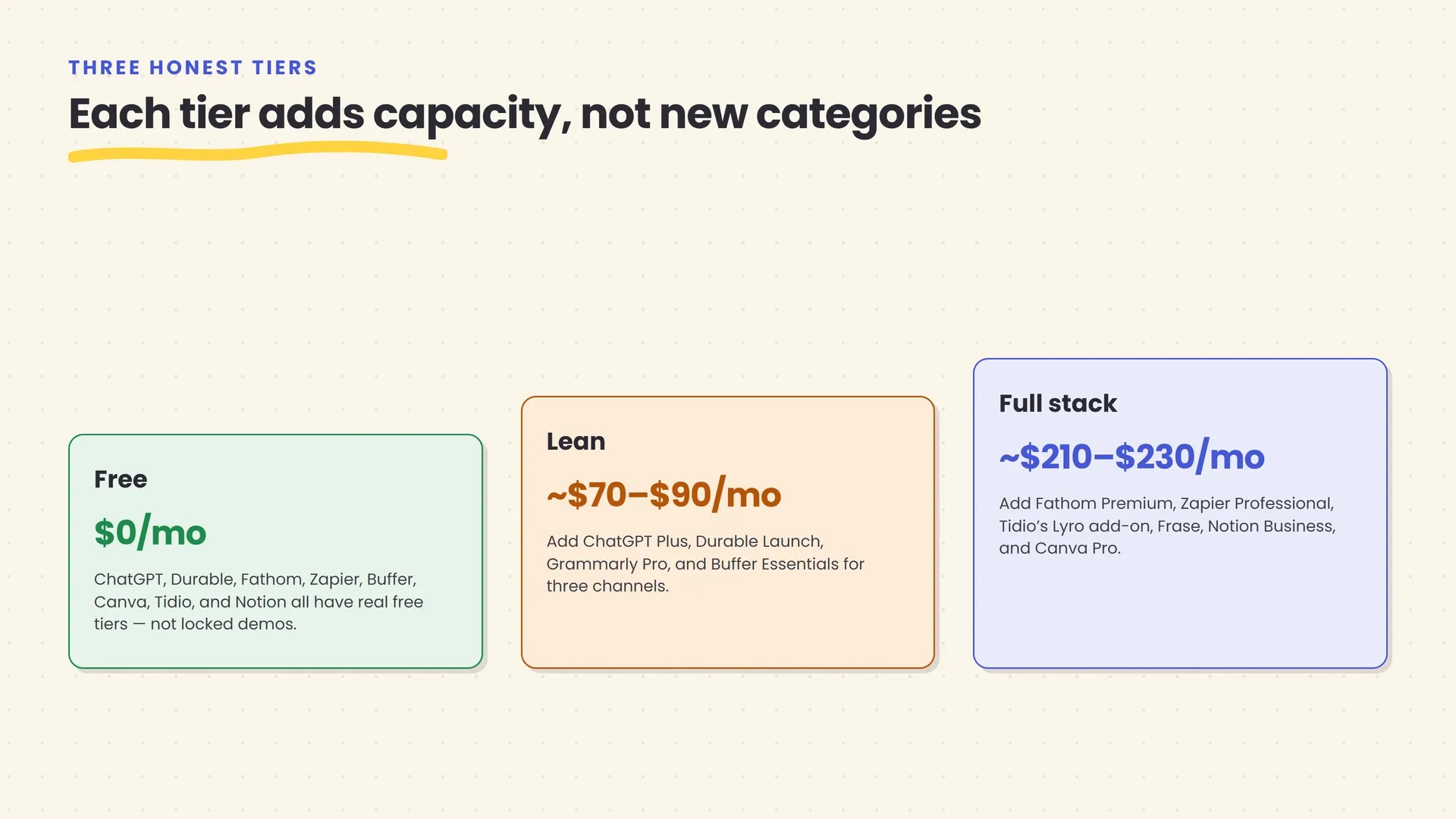
| Tier | Approx. monthly cost | What’s included |
|---|---|---|
| Free | $0 | ChatGPT (free), Durable (free site), Fathom (free unlimited recording), Zapier (100 tasks/mo), Buffer (3 channels), Canva (free tier), Tidio/Lyro (50 AI conversations/mo), Notion (free/Plus) |
| Lean | ~$70–$90/mo | Add ChatGPT Plus ($20), Durable Launch ($25), Grammarly Pro ($12), Buffer Essentials for 3 channels (~$15) |
| Full stack | ~$210–$230/mo | Add Fathom Premium ( |
A few things worth being honest about in this table. First, it deliberately excludes tools billed per-seat for a team, since this guide is scoped to a genuine one-person operation — the moment you hire your first person, several of these prices change. Second, these are current, verified figures as of mid-2026, and pricing in this category changes often enough that you should treat this as a snapshot to check against each vendor’s own pricing page, not a permanent number. Third, and most important: almost nothing in the Free row is a locked demo. Several of these vendors — Fathom, Buffer, Tidio — built genuinely usable free tiers specifically because solopreneurs and small teams are core to their customer base, not an afterthought before the “real” paid product.
A worked week: how this actually fits together
Frameworks are easier to trust once you’ve seen one running. Here’s a realistic week for a solo marketing consultant using a mid-tier version of this stack — not a dramatized case study, just what the days actually look like.
Monday. A lead fills out her Durable site’s contact form. A Zapier automation logs the inquiry to a spreadsheet and drafts (not sends) a reply asking two qualifying questions, using an AI step that reads what the person actually wrote rather than a generic template. She reviews and sends it from her phone before her first call.
Tuesday. Two client calls, both recorded through Fathom. She doesn’t take notes during either — she trusts the summary and action items that land in her inbox within minutes of each call ending, and spends the time she’d have spent scribbling actually paying attention to what the client is saying.
Wednesday. Content day. She asks ChatGPT to draft an outline for a client’s blog post from a rough set of notes, runs the draft against a Frase brief to check it covers what actually ranks, and schedules three days of social posts in Buffer, using its AI Assistant to adapt the same core message into a LinkedIn version and a shorter one for X.
Thursday. Her site’s chat widget, running on Tidio’s free Lyro allowance, has answered eleven routine pricing and availability questions overnight without her involvement — she skims the transcript log over coffee, confirming nothing needed her personally.
Friday. She opens Notion, asks Ask Notion what she quoted a returning client last quarter, adjusts the number for scope creep, and sends the proposal — the fifteen minutes it used to take to dig through old email threads collapsed into about ninety seconds.
Nothing in that week required a technical background or a large budget. What it required was deciding, tool by tool, exactly where each one’s judgment ends and hers begins — which is the actual skill this whole stack depends on, more than any individual product choice.
Where this goes wrong, honestly
None of the tools above are hard to set up. What trips up most solopreneurs isn’t the setup — it’s a handful of predictable failure modes that show up only after the excitement of a new tool wears off.
Subscription creep is a real, quiet cost
It’s easy to add a new tool every time a task feels annoying and hard to notice when three of them are now doing overlapping jobs. Before adding anything new, check whether a tool you already pay for already does 80% of the job — Buffer’s AI Assistant already drafts captions; you may not need a separate copywriting subscription just for social posts. A short quarterly audit of what you’re actually paying for, and whether you used it last month, catches most of this before it becomes real money.
Automating a customer-facing conversation too far, too fast
The tools in Jobs 5 and 6 above are genuinely good at drafting and routing. The mistake is trusting them to send, not just draft, on anything where being wrong costs you a customer relationship. Keep a human review step — again, that’s you — on refunds, complaints, and anything with a real dollar amount attached, at least until you’ve watched a specific workflow run correctly for weeks, not days.
Treating every tool’s data policy as an afterthought
Every tool in this stack that touches your email, calendar, or customer chats is a new door into information you’re responsible for protecting — client names, pricing, sometimes payment details. Most of the vendors named here publish real data-handling commitments (Notion and Fyxer both state they don’t train models on your content by default, for example), but policies differ enough between tools that it’s worth a five-minute check before connecting anything to real customer data, not after something goes wrong.
Chasing the newest tool instead of finishing the setup on the one you have
This is a fast-moving market — Tome, a well-regarded AI presentation tool, pivoted away from presentations entirely and shut down by April 2025; Relay.app, a solid automation tool, announced its own shutdown in mid-2026. New entrants launch constantly, and it’s tempting to keep evaluating rather than committing. A properly configured, boring tool you actually use beats an exciting one still sitting half-set-up in a browser tab.
How to actually decide what goes in your stack
Once the framework and the honest failure modes are on the table, choosing your specific stack comes down to three questions about your own business, not a feature comparison.
Which job is costing you the most real hours right now? Not which job sounds most impressive to automate — audit an actual week and see where your time is genuinely going. That’s the job that gets a tool first, everything else can wait.
Are you already paying for a version of this? If you’re on Google Workspace or Microsoft 365, several jobs in this guide — email, spreadsheets — may already be partly covered by your existing subscription before you add anything new. Check what’s bundled before buying a dedicated tool.
Can you commit to reviewing this tool’s output for the first month? Every tool in this stack works better with active oversight in its first few weeks — reading the AI-drafted replies before they auto-send, checking the automation’s output against a few known-correct examples. If you genuinely don’t have twenty minutes a week to spend supervising a new tool while it earns your trust, it’s not ready to be added yet, regardless of how good it looks in a demo.
Whichever tools you land on, nearly every one named in this guide has a real, no-cost way to try it first. Building one actual workflow this week — not reading another comparison — will tell you more than anything else in this article.
The bottom line
A solopreneur’s AI stack isn’t about collecting the most tools or the newest ones. It’s about matching a small, deliberate set of them to the actual, recurring jobs of running a one-person business — thinking and drafting, a website, email and meetings, marketing content, hands-off automation, customer questions, and keeping your notes and numbers from scattering — and then trusting the free and low-cost tiers of each one longer than feels comfortable before paying for more.
The 29.8 million people running a business alone in the U.S. right now aren’t succeeding because they found some secret tool nobody else knows about. The ones doing it well are mostly doing the boring thing: picking a tool for a specific, real job, watching it work for a few weeks, and only then deciding what’s next.
Start with one job. Pick one tool for it. See what it actually saves you before you add a second.
Frequently asked questions
How much should a solopreneur budget for AI tools per month?
A genuinely usable free stack costs $0 — ChatGPT, Fathom, Zapier, Buffer, Canva, Tidio, and Notion all have real free tiers. A lean paid stack covering a website, better writing, and basic scheduling runs roughly $70–$90/month. A fuller stack that adds automation, customer support, and content tooling lands around $200–$230/month. Add tools as a specific task starts costing you more time than the subscription would, not before.
Can I run this whole stack on free plans?
You can get further than most people expect. ChatGPT, Fathom, Zapier, Buffer, Canva, Tidio's Lyro agent, and Notion all have genuinely usable free tiers, not just time-limited trials. The catch is volume and depth: free plans cap AI conversations, queued posts, or automation steps, so a free stack works well below a certain amount of business activity and gets restrictive once you're doing real volume.
Which AI tool should a solopreneur start with?
A general chat assistant like ChatGPT or Claude, because almost every other job in this guide benefits from having one already in your daily habit — drafting an email, thinking through a pricing decision, summarizing a contract. Add a second tool only once you've found the first specific task that's genuinely repetitive and costing you real time each week, not because a list like this one says you should.
Is it safe to connect AI tools to my business email and customer data?
It's workable, but it's a decision, not a formality. Check what data a specific integration actually needs (often less than full inbox access), read whether the vendor trains its own models on your content by default, and keep a human review step on anything that sends money, issues a refund, or contacts a customer directly under your name.
How many AI tools is too many for one solopreneur to run?
There's no fixed number, but a useful test is whether you can name what each subscription is for without checking your bank statement. Most solopreneurs land on somewhere between six and ten tools covering distinct jobs — one general assistant, one for each recurring task category (email, meetings, social, support) — rather than several overlapping tools doing the same job slightly differently.
Can AI tools actually replace hiring my first employee?
For a narrow slice of work, often yes — routine drafting, scheduling, meeting notes, and tier-one customer questions are all things these tools now handle with real reliability. For judgment-heavy work — sales conversations that need to read a room, decisions with real financial or legal stakes — AI extends how much one person can carry, but it doesn't replace the judgment a first hire would bring.
Related articles
How to Automate Your Busywork With AI (No Coding Required)
You don't need to write code to get AI handling your busywork. A practical framework, the real no-code tools, honest costs, and mistakes to avoid.
Best No-Code AI Automation Tools in 2026: Zapier vs Make vs n8n
Zapier, Make, or n8n? A practical 2026 comparison of ease of use, AI features, integrations, pricing, control, and real-world fit.
42 Underrated AI Tools Worth Using in 2026
Most people's AI toolkit stops at ChatGPT. Here are 42 practical AI tools, organized by the job you're doing, that quietly save people real time in 2026.