
Free vs Paid AI Tools: What's Actually Worth Paying For
There’s a specific moment worth noticing: you’re testing a new AI tool, the free version is doing everything you need, and a small voice suggests you should probably be paying for this. Not because anything is broken. Not because you’ve hit a wall. Just a background hum of guilt, as if using something useful for free is somehow cheating.
Ignore that voice. It’s answering the wrong question. The interesting question was never “should I feel bad about this being free” — it’s “what, specifically, does the free version not let me do, and do I actually need to do that thing.” Most people never ask it, which is how they end up either paying $20 a month for a feature they’ll never touch, or hitting an invisible ceiling on client work for six months without realizing a $10 upgrade would have quietly fixed it.
This piece is that question, worked through properly. Not “is ChatGPT better than Claude” — the directory this article sits on top of handles head-to-head comparisons. This is the layer underneath: how free AI tools are actually built to make you pay eventually, what a subscription buys you when it’s real value rather than a paywall for its own sake, and — tool by tool, category by category — where the free version is genuinely enough and where it’s quietly costing you more than the upgrade would.
Quick answer: Free AI tools aren’t charity — they’re the top of a funnel, deliberately capped on usage, model quality, features, commercial rights, or data handling to make the limit felt eventually. A paid tier is worth it once you’ve actually hit one of those limits twice, not before. In practice: general chat, quick research, personal notes, and light writing help are usually fine free. Daily coding, real image-generation work, frequent meetings, multi-step automation, and anything touching client or sensitive data are where paying reliably earns its cost back. Test with the five-minute checklist near the end before you subscribe to anything.
Here’s what you’ll walk away knowing:
- Why free AI tools aren’t a smaller, worse version of the paid product by accident — they’re engineered funnels, and knowing the engineering tells you exactly what you’re being sold.
- The six specific things a paid plan actually buys — usage, model quality, features, commercial rights, data handling, and support — and which of those your task actually needs.
- A category-by-category breakdown of where the free tier holds up (chat, research, notes) and where it reliably doesn’t (coding, image generation, meetings, automation, anything commercial).
- The hidden cost of staying free longer than you should: not wasted money, but wasted time, default data training, and a quality ceiling you can’t see until you compare it to the paid version.
- A five-minute test to run before subscribing to anything, so the decision takes five minutes instead of the vague, ongoing guilt from the top of this page.
Why “free vs paid” is the wrong question
Phrased as “free vs paid,” the question invites a value judgment — free is the compromise, paid is the real product — that doesn’t actually hold up in 2026. Free tiers across AI tools have gotten dramatically more capable in the last two years. ChatGPT, Claude, and Perplexity all offer free access to genuinely useful, if capped, versions of frontier-adjacent models — a bar that would have cost real money in 2023. DeepSeek and Meta AI currently have no paid consumer tier at all. Treating “free” as automatically inferior misreads what’s actually happening in the market.
The better question is narrower and more answerable: what, specifically, does this free tier restrict, and does that restriction cost me more than the subscription would? That reframing does two things. First, it forces you to name the actual limit — a usage cap, an older model, a missing feature, no commercial license, or a privacy default you don’t like — instead of vaguely feeling like you should probably upgrade. Second, it makes the decision reversible and boring in the best sense: you check the specific restriction against your specific use, the same way you’d check any other purchase, rather than treating a $12-a-month subscription like a referendum on how serious you are about AI.
It also cuts both ways, which is easy to forget. The same reframing that stops you from over-paying also stops you from under-paying — from quietly working around a real limit for months because upgrading felt like an admission of something, rather than a five-dollar fix for a problem you’d already diagnosed. Neither the guilt nor the false thrift is really about the tool. Both are about not having asked the specific question yet.
This is also just a special case of a broader discipline worth having around any software purchase — matching a real, defined job to the tool built for it, rather than buying on vibes or FOMO. If that framework is new to you, the fuller version lives here; this article applies the same discipline to one specific, extremely common fork in the road.
How free AI tools actually make money
A free tier isn’t generosity. It’s a deliberate business decision, and it pays for itself in one of three ways — worth understanding, because each one tells you something different about what you’re trading for “free.”
Your usage becomes training data. Many consumer AI tools train their models, at least partly, on what free and individual-paid users type into them, by default, until the user finds and flips an opt-out toggle. ChatGPT’s own documentation confirms this pattern for Free, Plus, and Pro personal accounts; Team, Enterprise, and API usage are excluded by default instead. This is the oldest freemium trade in software — you get the product, the company gets the raw material to improve the next version of it — but it’s worth naming plainly rather than treating it as a footnote.
The free tier is a funnel, and the industry has settled numbers for how well that funnel is supposed to convert. A January 2026 survey of 200 B2B software products, reported by ChartMogul, found that 3–5% of free signups converting to paid is considered a good freemium conversion rate, and 8–12% is considered great — most products land well below even the good end of that range. Every capped feature, every “upgrade to continue” prompt, every model that quietly gets slower under heavy free use exists to nudge some single-digit percentage of users across that line. You are, statistically, more likely to stay free forever than to convert — which is exactly why the free tier has to be genuinely useful in its own right, not just a broken demo.
Read that conversion range again, because it reframes what “just try the free version” actually means for a company: if only three to twelve people out of every hundred free signups ever pay, the other eighty-eight to ninety-seven are the free tier working as designed, not the funnel failing. You are not an edge case if you stay free forever. Statistically, you’re the median outcome — which is one more reason not to feel a residual obligation to upgrade something that’s genuinely doing its job for free.
A minority of tools are free with no upgrade funnel at all. DeepSeek has no paid consumer tier; its economics work differently — released as open-weight models with data processed on servers in China, which is its own tradeoff, covered more in the AI chat assistants category. Meta AI is subsidized by the same advertising and engagement economics that fund the rest of Meta’s apps. These aren’t loss leaders angling for a future upgrade — they’re a genuinely different model, and worth knowing apart from the freemium-funnel majority.
None of this makes free tiers bad. It just means the limit you eventually hit is not an accident or a bug — it’s the specific point someone decided would make you consider paying. Knowing that turns “why can’t I do this for free” from a mild grievance into useful information: that limit is exactly where the product’s edges were deliberately drawn.
It also explains why free tiers keep getting better rather than worse over time, which can feel counterintuitive. A funnel only works if the top of it is genuinely good — a free tier stingy enough to feel like a broken demo converts almost nobody, because nobody sticks around long enough to hit the limit that was supposed to convert them. The companies running the healthiest freemium numbers tend to be the ones most willing to give away a real, complete-feeling product and gate only the specific things that matter to their highest-intent users. That’s good news for anyone reading this mostly to stay free: the competitive pressure to keep improving the free tier is real and ongoing, not a phase that ends once a company has enough users.
The six things a paid plan actually buys you
Strip away the marketing language on any pricing page and a paid AI tier is really only ever selling six things. Not every tool restricts all six — some gate mainly on usage, others mainly on features — but almost every upgrade decision comes down to whether you need one of these specifically, not “more” in the abstract.
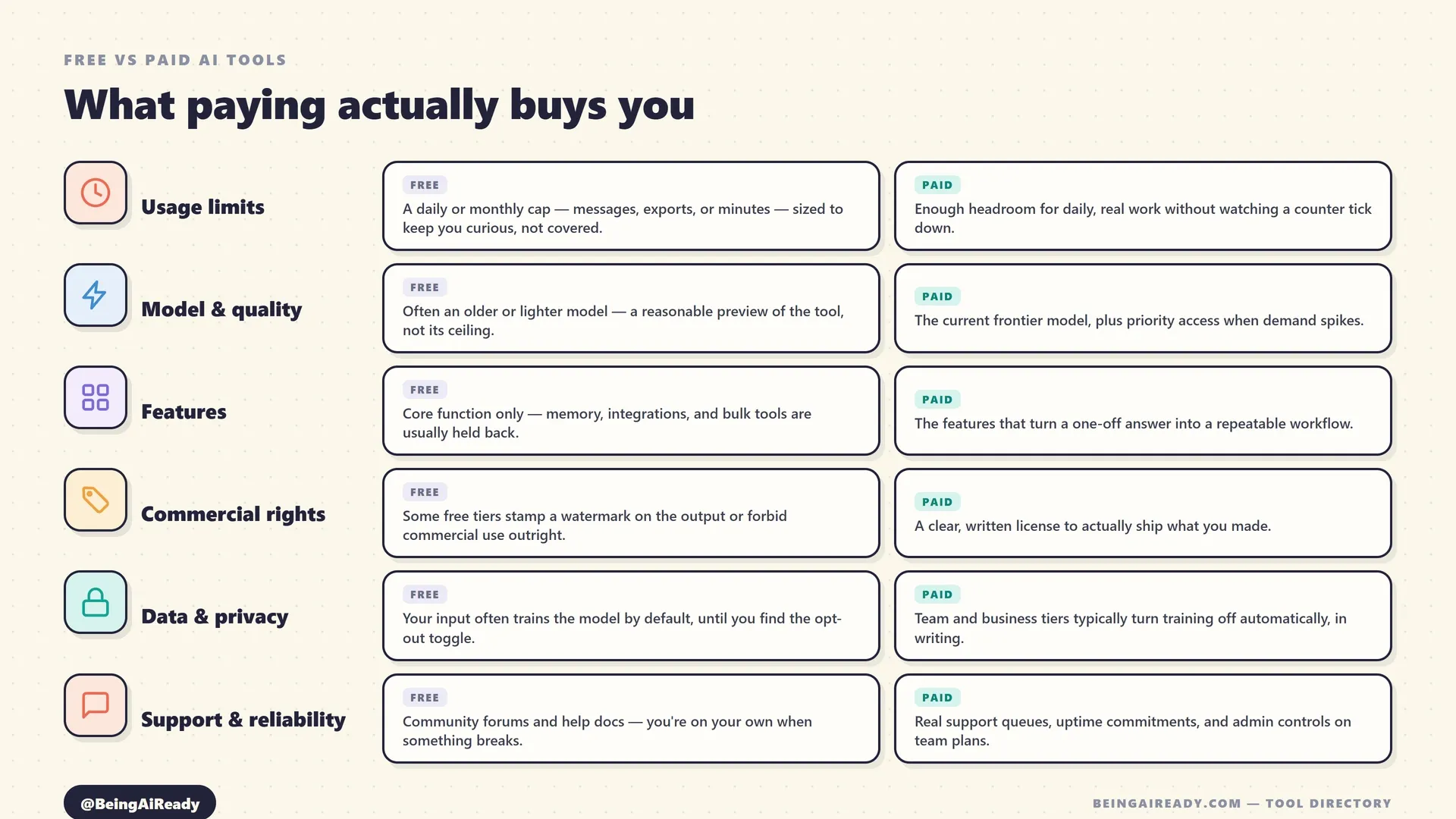
Usage limits. The most common gate by far — a cap on messages, exports, credits, or minutes, sized deliberately to cover light use and nothing more. Otter.ai’s free plan gives 300 transcription minutes a month, genuinely useful for occasional calls and useless the moment you’re in back-to-back meetings most days. Zapier’s free plan caps at 100 tasks a month and restricts you to single-trigger, single-action Zaps — fine for testing, too thin for a real workflow. Gamma’s free credits don’t even renew monthly; they’re a one-time allowance that a single deck can burn through a meaningful chunk of. These caps aren’t arbitrary — they’re set at exactly the point where a light user never notices and a real user always does.
Model and quality. Some tools quietly route free users to an older, cheaper, or slower model, or de-prioritize free traffic when the paid queue gets long. This is the hardest limit to notice because nothing tells you explicitly — the output is just a little less sharp, a little more likely to need a second pass. Paid tiers typically buy the current frontier model plus priority access when demand spikes, which matters far more on a task where quality is the whole point (a client-facing image, a load-bearing piece of code) than on one where “good enough” already is.
Features. Free tiers usually ship the core function and hold back the parts that turn a single answer into a repeatable workflow — memory across sessions, integrations with other tools, bulk export, admin controls. Notion AI is the sharpest example in this category: basic writing help exists on the free and Plus tiers, but Ask Notion’s workspace-wide search and AI Agents require the $20/user/month Business plan specifically — not a small add-on, a genuinely different tier of product.
Commercial rights. This is the one people miss most often, because it doesn’t show up as a usage number — it shows up as a license clause. Midjourney has had no free tier at all since March 2023, and even its paid plans require the higher Pro or Mega tier once your company clears $1 million in annual revenue. BigVu’s free tier watermarks every export, which makes it fine for testing and unusable for anything you’d actually publish. If the output is headed anywhere public or commercial, the free tier’s silence on usage rights is itself an answer.
Data and privacy. This is the least consistent of the six, which is exactly why it’s worth checking per tool rather than assuming a pattern. Gamma trains on individual Free, Plus, Pro, and Ultra content by default, with Team and Business workspaces automatically excluded. Zapier uses de-identified customer data to train its own AI features by default, with an opt-out form available and Enterprise accounts auto-excluded. Notion, by contrast, states it does not use customer content to train its own or third-party models on any tier, free included, and contractually bars its AI subprocessors from doing so — a genuine exception to the usual pattern, not a marketing rephrasing of it. The lesson isn’t “free always trains, paid never does.” It’s that the answer is tool-specific and worth thirty seconds on the current privacy page before anything sensitive goes in.
Support and reliability. Free users generally get community forums and help documentation; paid, especially business and enterprise tiers, get real support queues, uptime commitments, and centralized admin controls. Irrelevant for casual use, and the whole ballgame the moment a tool is load-bearing for a team.
Where free is genuinely enough, and where paying earns its cost back
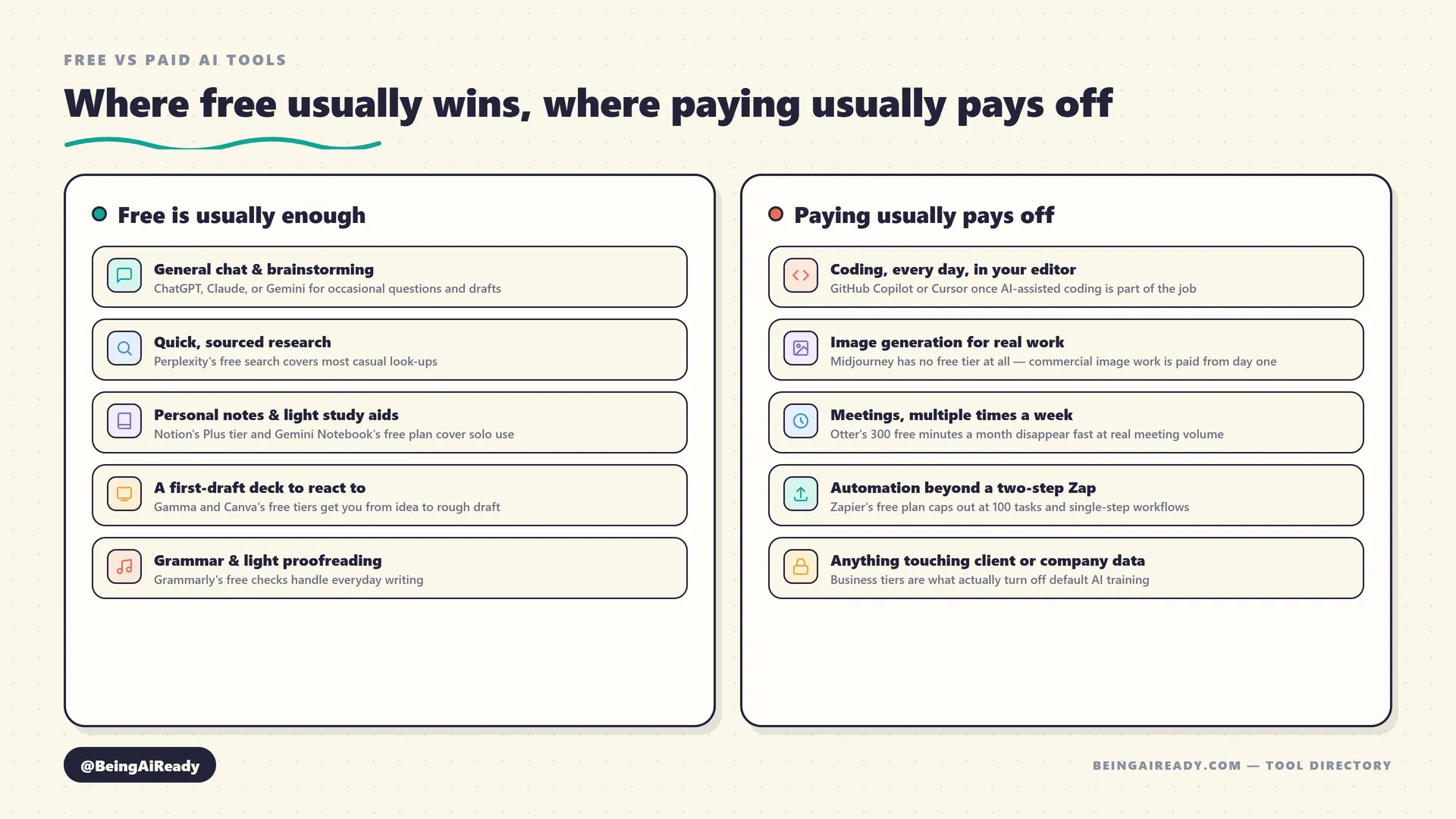
Here’s the same six-factor lens applied to specific categories and tools, because the abstract version only gets you so far. Some of this will look obvious once it’s written down — that’s rather the point. The categories where paying reliably pays off share a pattern: high frequency, commercial output, or sensitive data. The categories where free reliably holds up share the opposite one: occasional use, low stakes, personal output.
| Category | Free tier reality | Paying usually pays off when |
|---|---|---|
| General chat assistants | ChatGPT, Claude, and Gemini all have genuinely usable free tiers; DeepSeek and Meta AI have no paid consumer tier at all | You need the current frontier model daily, or memory and Projects-style features that persist across sessions |
| Research | Perplexity’s free search and Gemini Notebook’s free 50-sources-per-notebook plan cover most casual and academic use | You run Deep Research reports often, or need higher per-notebook source caps for a large project |
| Writing & editing | Grammarly’s free plan handles real grammar and spelling checks plus 100 AI prompts a month | You want full-sentence rewrites, plagiarism detection, or brand-voice consistency across a team |
| Coding assistants | GitHub Copilot’s free tier gives 2,000 completions a month; Cursor’s Hobby tier is free to try | AI-assisted coding is part of your actual daily workflow, not an occasional experiment |
| Image generation | Several competitors offer free credits; Midjourney has had none since March 2023 | Any output is commercial — Midjourney requires a paid plan by design, no exceptions |
| Presentation makers | Gamma and Canva both offer free plans usable for a first draft | You present often enough that one-time credits or watermark-free export actually matters |
| Note-taking | Notion AI’s free and Plus tiers cover basic writing help for individuals | You need Ask Notion’s workspace-wide search or AI Agents — Business plan only |
| Meeting assistants | Otter.ai gives 300 free minutes a month, no card required | You’re in more than a couple of hours of recorded meetings a week |
| Automation | Zapier free plan: 100 tasks/month, two-step Zaps only; n8n’s self-hosted Community Edition is free indefinitely | Your workflow needs more than two steps, or you want a hosted (not self-managed) automation platform |
A few of these deserve a little more unpacking than the table allows.
General chat assistants are the strongest case for staying free, and probably the most over-subscribed-to category on this entire site. If your use is occasional questions, brainstorming, and quick drafts, a free ChatGPT, Claude, or Gemini account covers essentially all of it — this is the one place where “just use the free version” is close to universal advice, not a hedge. The moment that changes is genuine daily reliance: memory across sessions, a large-document workflow like Claude’s Projects, or hitting a message cap during a busy week often enough that it becomes friction rather than an occasional annoyance.
Coding is the opposite case. GitHub Copilot’s free 2,000 completions a month sound generous until you’re actually writing code for a living — a working developer burns through that in days, not weeks. This is a category where the frequency argument is close to automatic: if AI-assisted coding is part of your actual job, the $10-a-month entry price on Copilot is one of the easiest “yes” decisions in this entire piece, because the free tier isn’t really built for daily professional use in the first place.
Image generation is the cleanest example of “no free tier, full stop.” Midjourney removed its free trial back in March 2023 and hasn’t brought one back — if a project needs Midjourney specifically, there is no free-vs-paid decision to make, only a plan-tier one. Worth knowing before you spend twenty minutes hunting for a free way in that doesn’t exist.
Automation is where the free-tier gap is easiest to underestimate. Zapier’s free plan isn’t just capped on volume — it’s structurally limited to single-trigger, single-action Zaps, which rules out most workflows that would actually be worth automating in the first place. If your team is technical and comfortable managing a server, n8n’s self-hosted Community Edition is free indefinitely with no execution cap, which is a genuinely different trade than Zapier’s capped-and-cloud-only model — worth knowing before assuming “automation” universally means “pay Zapier.”
Not every upgrade costs the same, either
It’s worth saying plainly: “paid” isn’t one price. Voice generation is a useful reminder that the entry cost of crossing from free to paid varies enormously even within a single category. ElevenLabs’ Starter plan begins at $6 a month — closer to a rounding error than a real budget decision, and a plausible instant “yes” the moment a free tier’s limited minutes stop covering a real project. Writing tools sit at the opposite extreme: Grammarly’s Pro plan starts around $12 a month, Copy.ai’s Chat plan around $29, and Jasper’s Pro plan around $59 — three tools nominally in the same category, with a nearly five-fold spread in what “paid” means. The category a tool sits in tells you almost nothing about what paying will actually cost; only that specific tool’s pricing page does. Worth checking before assuming any upgrade is either trivially cheap or a serious commitment.
The hidden cost of staying free
None of this is an argument to upgrade everything immediately — plenty of free tiers are the right long-term answer for plenty of use cases. But staying free past the point where it fits has real costs that don’t show up on a bank statement, and they’re worth naming because they’re easy to miss precisely because no invoice arrives.
Time is the first one. Working around a usage cap — rationing questions, waiting for a monthly reset, manually stitching together what a paid feature would have done in one step — costs time every single time it happens. Multiply a small daily friction by months of use and it adds up to more than most subscriptions would have cost, just paid in a currency that doesn’t show up on a budget line.
Default data training is the second, and the one people underweight most. Free and individual-paid consumer tiers across the major assistants train on your input by default in most cases — ChatGPT does, until you find the opt-out in Settings; the pattern repeats across most consumer AI products, though the specifics and opt-out mechanics vary tool by tool and change over time, so the current settings page is the only reliable source. Team and Business tiers typically flip this to no-training by default instead, which is a real, concrete difference — not a marketing distinction — for anyone putting client names, unreleased work, or financial detail into a chat window. If you wouldn’t post it publicly, don’t paste it into a free consumer tool without checking first.
Data risk isn’t only about model training, either. Otter.ai faces an unresolved federal class action, as of mid-2026, over whether its meeting bot obtains adequate consent before recording — a reminder that “is this tool safe to use” can hinge on consent and recording law in your jurisdiction, not just on a training-data toggle. Free or paid, that’s a question worth a minute’s research before a tool starts silently joining your calls.
A quality ceiling is the third, and it’s the quietest. When a free tier routes you to an older or lighter model, you don’t get an error message — you get output that’s a little less sharp than it could be, with no obvious signal that anything is being held back. This mostly doesn’t matter. It matters more than people expect on the exact tasks where quality is the entire point — a client deliverable, code shipping to production, an image going on a real campaign. The honest test: pull one piece of real work you’ve already done for free, and re-run it once on the paid tier. If the difference is invisible, the ceiling was never costing you anything. If it isn’t, you now know exactly what you’ve been leaving on the table.
And there’s a genuinely ironic fourth cost, at the opposite end of the spectrum: subscription sprawl. The corrective habit is the same one worth applying to any software spend — prefer month-to-month over annual until a tool has proven itself, use free tiers to validate before paying, and put a quarterly review on the calendar to catch the subscriptions nobody’s actually opening anymore. Staying free too long and upgrading too eagerly are the same underlying mistake, just pointed in opposite directions — neither one is “checking what you actually use, against what you’re actually paying for.”
The five-minute worth-paying test
Before subscribing to anything, run the tool through five short questions. This isn’t a scientific instrument — it’s a forcing function, designed to convert a vague “I’ve been meaning to upgrade this” into a specific, five-minute yes or no.
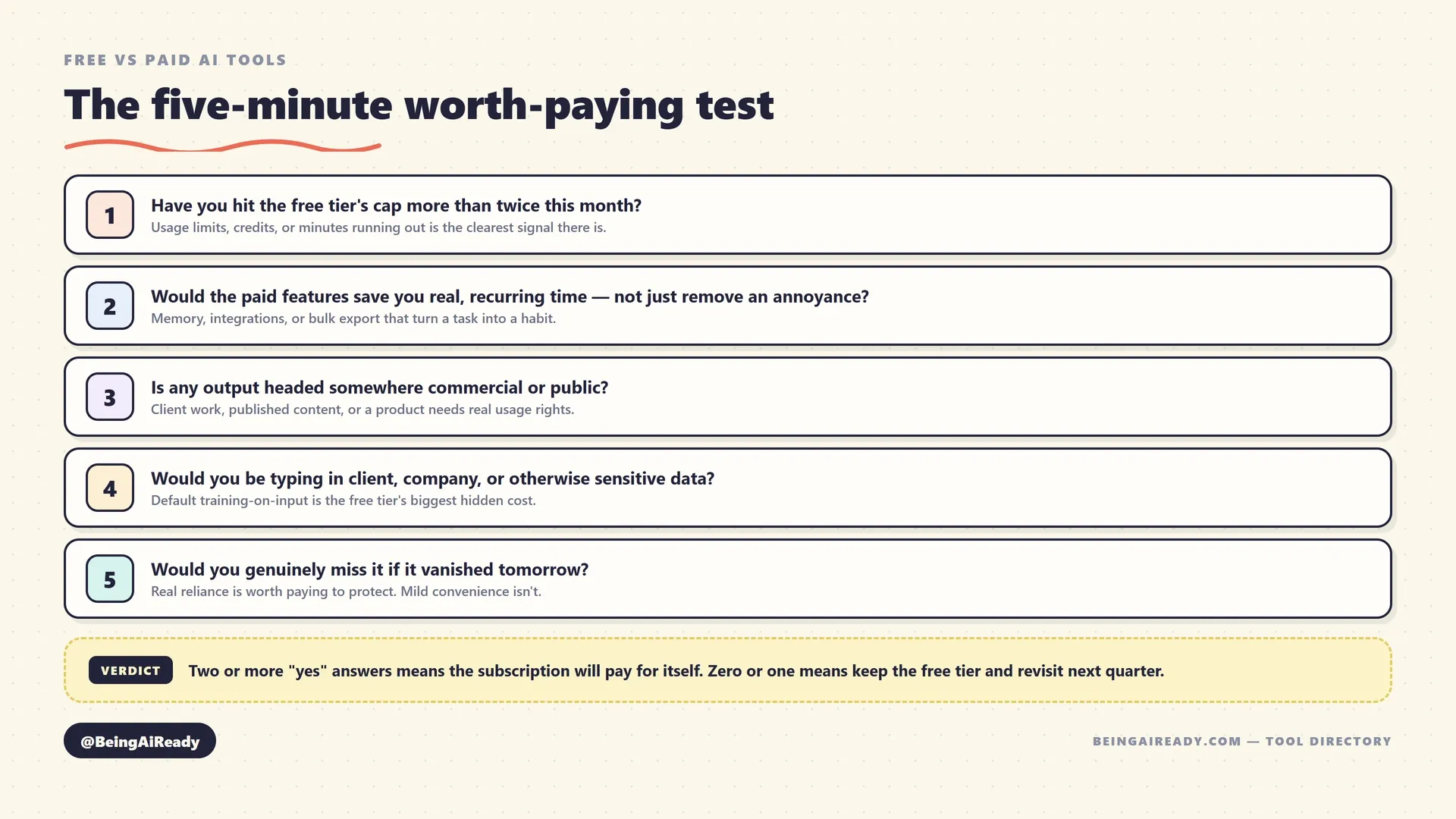
Have you hit the free tier’s cap more than twice this month? A one-time overage is a busy week. A repeated one is the product telling you, correctly, that your actual usage has outgrown the free plan’s design point.
Would the paid features save real, recurring time — not just remove a mild annoyance? Memory, integrations, or bulk export that turn a one-off task into a repeatable workflow are worth paying for. A feature that’s merely nice to have, used once a month, usually isn’t.
Is any output headed somewhere commercial or public? Client work, published content, or anything shipping in a product needs real, written usage rights — not a free tier’s silence on the subject. This one overrides the others: even light, occasional commercial use can require a paid plan regardless of volume, as Midjourney’s all-paid model demonstrates.
Would you be typing in client, company, or otherwise sensitive data? If yes, the default-training question from the section above stops being theoretical. Move to a plan with an explicit no-training commitment before it becomes a habit, not after a close call makes you notice.
Would you genuinely miss this tool if it vanished tomorrow? This is the honesty check. Real, felt reliance is worth paying to protect and improve. Mild convenience you’d shrug off in a week isn’t — and no amount of psychological upgrade-guilt should talk you into paying for it anyway.
Two or more “yes” answers is a real, specific signal that the subscription will pay for itself. Zero or one means the free tier is still doing exactly the job it’s designed to do, and the right move is to keep using it and revisit the question next quarter — not to upgrade out of vague obligation. This same real-task discipline, not a vendor’s demo, is the same principle behind running a proper trial before committing to any tool — apply it here just as rigorously as you would to a brand-new purchase.
The test in action: three real decisions
The five questions are easy to nod along to and more useful once you watch them actually rule something in or out. Three genuinely different situations, the same test each time.
A freelance marketer drafting weekly client newsletters. She’s been using free ChatGPT for three months. Test: she hasn’t hit a message cap she’s noticed (no), the paid features — memory, Custom GPTs — wouldn’t save much for a task this simple (weak no), but the output goes straight into client newsletters, which is commercial use of a tool with a default consumer-training policy (yes), and client names and campaign details are going into a free account by default (yes). Two clear yeses, both about where the output and input go, not about volume. Verdict: upgrade to Plus, or better, a business-tier plan with an explicit no-training commitment — the $20 a month is close to irrelevant next to what’s actually at stake.
A two-person startup automating lead intake. They’re on Zapier’s free plan, which technically works because their first automation is a single trigger-action pair. Test: they haven’t hit the 100-task cap (no, yet), but the next workflow they want — new lead in, enrichment lookup, CRM update, Slack ping — is four steps, which the free plan’s two-step ceiling structurally can’t do (yes), it’s not commercial-rights-relevant in the Midjourney sense (no), no sensitive data beyond ordinary CRM fields (no), and they’d genuinely be stuck without it once they build it (yes). Two yeses, for a different reason than the first example — a hard structural wall, not a soft volume one. Verdict: upgrade the moment the four-step workflow is actually designed, not before.
A grad student using Gemini Notebook for a thesis. Free tier: 100 notebooks, 50 sources per notebook, 50 chats a day. Test: nowhere near any of those caps (no), no paid feature she’s identified a need for yet (no), nothing commercial about a thesis draft (no), her sources are already-public academic papers, not sensitive data (no), and she’d be mildly inconvenienced, not genuinely stuck, without Google AI Plus (no). Zero yeses. Verdict: stay free, and don’t feel obligated to reconsider until something on the list actually changes — which, for a bounded academic project, may be never.
Same five questions, three different verdicts, for three different reasons — a soft volume cap, a hard structural wall, and a case where free was simply already correct. That range is the entire point of running the test explicitly instead of going by feel.
Where people get this wrong
A handful of mistakes account for most of the bad free-vs-paid decisions, and naming them directly is worth more than another abstract principle.
Upgrading out of guilt, not need. The instinct from the top of this article — a vague sense that using something useful for free is somehow illegitimate — leads people to subscribe the moment a free tool impresses them, before they’ve actually felt a real limit. Let the tool earn the upgrade through an actual restriction, not through how good the demo felt.
Running commercial work through a personal free account. This is the costliest version of the mistake, because it compounds two problems at once: no explicit usage rights for the output, and a default-training policy that may be quietly retaining client or proprietary material. Both are avoidable with a five-minute check of the current pricing and privacy pages before the habit sets in, not after.
Treating “unlimited” as inherently valuable. The highest tier of almost every tool is priced for power users who will actually use the extra headroom. If your usage doesn’t come close to a lower tier’s cap, the unlimited plan isn’t buying you anything — it’s buying you a bigger number you’ll never approach.
Never re-checking a subscription once it’s running. The flip side of upgrading too eagerly is failing to downgrade once the need that justified the upgrade has passed — a project ends, a role changes, usage quietly drops, and the subscription keeps auto-renewing on inertia. The same quarterly review that catches redundant tools catches this too.
Assuming every free tier works the same way. Zapier’s free plan and n8n’s self-hosted free tier solve the same broad problem through completely different economics — one capped-and-cloud, one unlimited-and-self-managed. Midjourney has no free tier; DeepSeek has no paid one. Reading one tool’s pricing page and assuming the category works the same way everywhere is how avoidable surprises happen.
The bottom line
Free AI tools in 2026 are good enough that “free vs paid” stopped being a quality question and became a fit question. The free tier isn’t a compromised version of the product — it’s a specific, deliberately drawn set of limits on usage, model access, features, commercial rights, data handling, or support, built to be genuinely useful right up until it isn’t. Your job isn’t to decide whether you’re the kind of person who pays for AI tools. It’s to name, specifically, which of those six limits your actual task runs into — and then check whether the subscription price is smaller than what that limit is quietly costing you.
Run the five-minute test before you subscribe to anything, and run it again next quarter on what you’re already paying for. Most people either pay too early, out of a vague sense that they should, or stay free too long, out of inertia — both are the same mistake in opposite directions, and both are fixable with the same five questions.
When you’re ready to see how a specific tool’s free and paid tiers actually compare, the AI tool directory is where the tool-by-tool detail lives — pricing, features, and the honest tradeoffs for each category this article covered. This piece is the lens. The directory is what to point it at.
Frequently asked questions
Is it ever worth paying for an AI tool that has a good free tier?
Yes, once you hit a real limit the free tier imposes on purpose -- a usage cap, an older model, a missing feature, or no commercial-use rights. Paying before you've felt that limit is usually premature; paying after you've hit it twice in a month usually pays for itself. The free tier isn't a lesser product by accident -- it's sized precisely to make you curious, not covered.
Do free AI tools train on what I type into them?
Often, yes, by default. ChatGPT's and Gemini's free and individual-paid consumer tiers both train on your input unless you manually opt out in settings; Claude gives consumer plans a similar Privacy Settings toggle, and Anthropic has changed the default on this more than once, so it's worth checking your current setting rather than assuming. Business and enterprise tiers across all three typically turn training off automatically instead. Treat anything you paste into a free consumer AI tool as potentially retained until you've confirmed otherwise.
Which AI tools genuinely have no free tier at all?
Midjourney is the clearest example -- it's been subscription-only since March 2023, with no free trial. Most other categories offer at least a limited free tier, though the limits vary enormously: some, like DeepSeek and Meta AI, currently have no paid consumer tier at all, which is the opposite problem worth knowing about too.
What's the single biggest mistake people make with free vs paid AI tools?
Paying for capacity they don't use, while using capacity they haven't paid for. Subscribing to a $20/month plan the moment a free tool looks promising is common and usually premature. So is running client work through a personal free account that trains on your input and carries no commercial license -- a real risk masquerading as a savings.
Should a business ever use the free tier of an AI tool?
For genuinely low-stakes, individual, exploratory use, yes -- testing whether a tool fits before buying seats for a team is exactly what a free tier is for. For anything touching client data, proprietary material, or work that will ship publicly, move to a paid tier with an explicit no-training commitment and commercial-use rights before it becomes a habit, not after.
How often should I re-check whether a paid AI subscription is still worth it?
Quarterly is a sensible default -- often enough to catch a tool you've stopped using, rarely enough that it doesn't become its own chore. Check actual usage, not intent: a tool you meant to use daily but opened four times last month has already answered the question.
Related articles

How to Choose the Right AI Tool: A Buyer's Framework
A calm, no-hype framework for choosing the right AI tool for any task: define the job, judge the real criteria, run a cheap trial, and avoid costly switching.
Best AI Coding Assistants for Beginners in 2026
A practical comparison of the best AI coding assistants for beginners, including GitHub Copilot, Replit, Cursor, Antigravity, Amazon Q, and JetBrains AI.
Best AI Meeting Assistants in 2026 (Ranked & Compared)
The best AI meeting assistants in 2026, ranked by notes, integrations, workflow automation, value, privacy controls, and fit for real teams.